

Managing your Maven dependency tree is much more than a build-time convenience; it’s a critical security and compliance function. Don’t think of it as a simple list. See it for what it truly is: the complete architectural blueprint of your software’s supply chain. This blueprint reveals every single component, both direct and inherited, that makes up your final product.
Your Dependency Tree Is a Security Blueprint
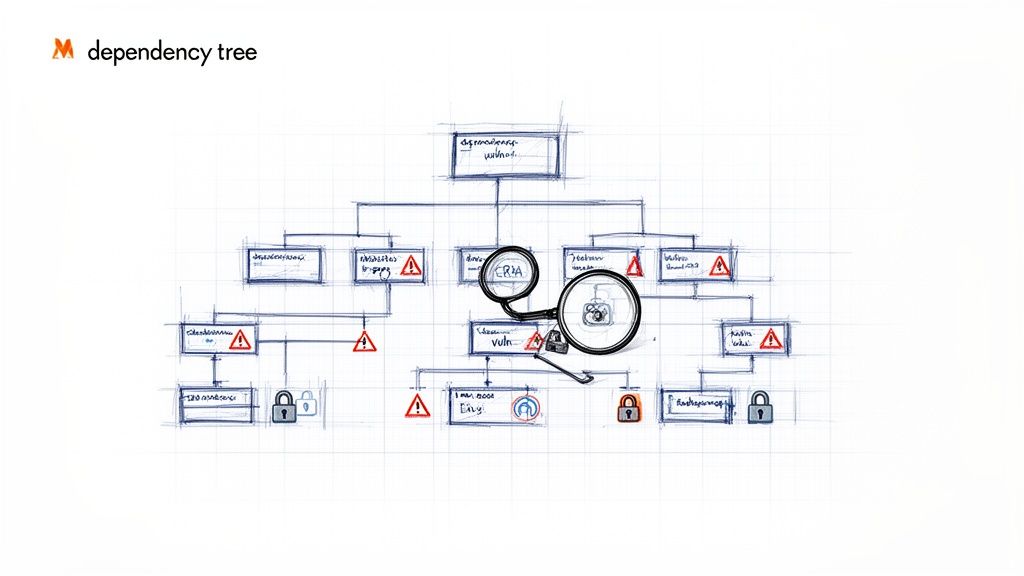
Every project kicks off with a handful of direct dependencies you add to your pom.xml. Simple enough. But each of those brings its own set of transitive dependencies, quickly creating a complex, interconnected web. This web is exactly where hidden risks love to reside, turning a seemingly straightforward project into a significant security liability.
For example, adding a single dependency like spring-boot-starter-web can transitively pull in dozens of other libraries, such as Jackson for JSON processing, Tomcat as a web server, and various Spring framework modules. Your project’s security now depends on every single one of them.
The scale of this problem is massive. A deep analysis of over 13,638 Maven-based repositories in the European software manufacturing sector found that generating dependency trees uncovered an average of 52,417 version conflicts per project sample. For EU-based manufacturers, major version conflicts alone were responsible for 15.0% of these issues. It’s a stark reminder of how transitive dependencies in Maven ecosystems propagate vulnerabilities across entire supply chains.
From Technical Debt to Business Risk
Ignoring the complexity of your dependency tree opens the door to two major categories of risk, both with direct business consequences:
- Operational Instability: Conflicting versions of a single library can cause unpredictable runtime errors, broken builds, and countless hours lost to debugging. When one direct dependency pulls in
library-A:1.0and another pulls inlibrary-A:2.0, Maven’s resolution strategy might pick a version that breaks your application in subtle, frustrating ways. - Inherited Vulnerabilities: Even worse, a transitive dependency can sneak a known security vulnerability (CVE) deep inside your application’s structure. Without a clear view of the full tree, you are unknowingly shipping compromised code directly to your customers.
A tangled dependency tree isn’t just a developer’s headache; it’s an unmanaged security risk that directly impacts your ability to ship secure and compliant software. It’s the first line of defence in building a resilient product.
This kind of visibility is no longer optional, especially with regulations like the EU’s Cyber Resilience Act (CRA) on the horizon. The CRA demands that manufacturers know exactly what is in their software and can respond to vulnerabilities throughout its lifecycle. A well-understood Maven dependency tree provides the foundational evidence you need for a secure software development life cycle.
To get ahead of these issues, the best approach is to adopt a comprehensive, programmatic shift left security approach. This means moving security from a last-minute check to an integral part of your development process, right from the start. Understanding and managing your dependencies is the first, most crucial step in that direction—turning a technical artefact into a core pillar of your compliance strategy.
🇪🇺 Building software or connected devices sold in the EU?
The Cyber Resilience Act applies between 2026 and 2027, and the risk assessment is the foundation of the whole technical file.
How to Generate and Visualise Your Dependency Tree
Alright, let’s move from theory to practice. Getting a clear picture of your project’s dependency tree is the first real step towards wrangling your software supply chain. Your main tool for this job is the Maven Dependency Plugin, which gives you a straightforward command to reveal the entire hierarchy of libraries your project is built on.
The most fundamental command you’ll run is mvn dependency:tree. Fire that off from your project’s root directory, and it will print the complete tree right to your console. You’ll see every direct and transitive dependency laid out in a clear hierarchy.
Here’s the command in its simplest form:
mvn dependency:tree
This gives you an instant snapshot, but its real power comes alive when you start using parameters to filter the output and zero in on what you’re looking for.
Refining Your Analysis with Command Parameters
The default output is great for a quick look, but it can be noisy. When you’re hunting down a specific problem, you need to cut through that noise. This is where parameters are essential—they turn a massive text dump into actionable intelligence.
For instance, if you suspect a particular library is causing trouble, you can isolate it with the -Dincludes parameter. This tells Maven to only show dependency paths that involve that specific artifact.
Imagine you’re tracking down an old, vulnerable version of log4j-core. You could run this:
mvn dependency:tree -Dincludes=org.apache.logging.log4j:log4j-core
Suddenly, the output is much cleaner. It will only show the branches of the tree leading to log4j-core, pointing you directly to the dependencies responsible for pulling it in. It’s an incredibly effective way to pinpoint the source of a vulnerability or a version conflict.
On the flip side, the -Dexcludes parameter helps you hide dependencies you aren’t interested in, clearing the view to focus on other areas.
Uncovering Hidden Dependencies and Creating Auditable Records
Sometimes, the most important information is what Maven isn’t showing you. By default, its “nearest definition” strategy resolves version conflicts by simply picking one and silently omitting the others. To see everything, including the versions that lost the battle, you need the -Dverbose flag.
mvn dependency:tree -Dverbose
This forces Maven to show the full picture, revealing dependencies marked as (omitted for conflict). This verbose output is crucial for understanding why Maven made a certain choice and for double-checking that the selected version is actually the one you want.
For compliance and auditing, especially under regulations like the CRA, having a permanent record of your dependencies is non-negotiable. You should get into the habit of redirecting the output to a file. This creates a tangible artifact that you can store, share, and analyse later.
Redirecting your dependency tree output to a file is a critical habit. It transforms a fleeting console log into a permanent, auditable record of your software’s composition at a specific point in time.
To save the output, just use the standard redirection operator:
mvn dependency:tree > dependency-tree.txt
This dependency-tree.txt file is now your evidence for compliance checks, security audits, and internal reviews.
Visualising the Tree in Your IDE
Let’s be honest, staring at a massive text file isn’t always the most intuitive way to understand complex relationships. This is where modern IDEs like IntelliJ IDEA and Eclipse really shine. They can take the raw mvn dependency:tree output—or use their own built-in tools—to generate an interactive, graphical map of your dependencies.
- In IntelliJ IDEA: Just open your
pom.xml, right-click in the editor, and select “Diagrams” > “Show Dependencies.” This pops up a visual map where you can easily trace connections, spot conflicts, and untangle complex transitive chains. - In Eclipse: The m2e plugin (Maven Integration for Eclipse) adds a “Dependency Hierarchy” tab to the POM editor. It presents the tree in a browsable format, letting you expand and collapse nodes to explore the relationships between your artifacts.
These visual tools turn an abstract hierarchy into a concrete map, making it far easier to grasp how components are connected and where potential issues are hiding. It’s especially useful when you need to explain a dependency problem to team members who might not be as comfortable navigating Maven’s text-based output.
Interpreting the Output to Find Conflicts and Bloat
Generating the Maven dependency tree is one thing; understanding what it’s telling you is another. At first glance, the raw text output can feel a bit cryptic, filled with symbols and indentations that map out your project’s components. Learning to read this map is crucial for spotting hidden issues before they cause real trouble.
The tree’s structure is visualised with a simple syntax. Each line represents a single dependency, and the indentation shows its relationship to the parent artifact.
+-or-: These symbols mark the direct children of a dependency.|: This vertical line connects sibling dependencies, showing they share the same parent.
Understanding this structure is the first step. The real skill lies in using it to identify version conflicts, redundant libraries, and unnecessary bloat that can compromise both performance and security.
The flowchart below illustrates the simple workflow from generation to visualisation, turning raw data into a clear map for analysis.
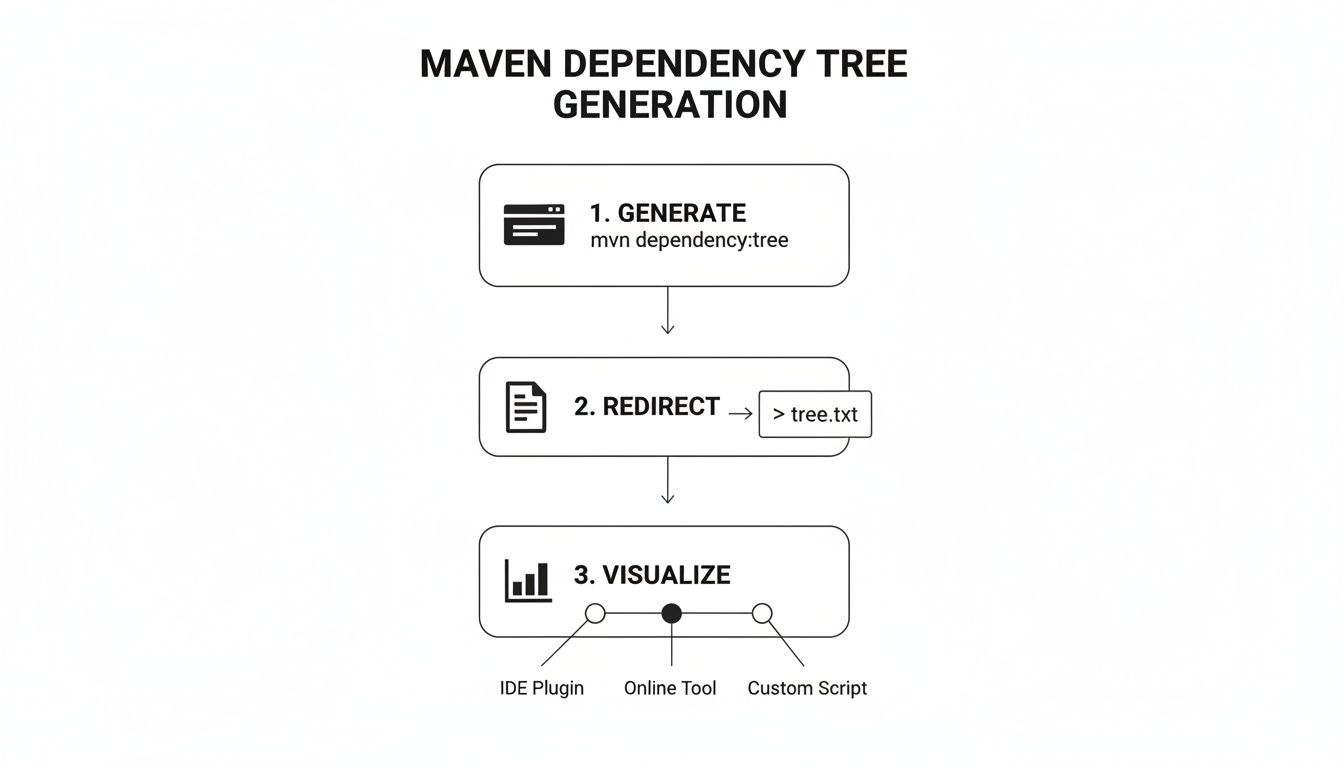
This process transforms a console command into a file that can be audited or visualised, making complex hierarchies much easier to make sense of.
Identifying Transitive Dependency Conflicts
The most common and critical issue you’ll find is a dependency conflict. This happens when two of your direct dependencies pull in different versions of the same transitive dependency. Maven has to choose one, and its choice can have serious consequences.
Let’s look at a practical example. Imagine your pom.xml includes library-A:1.0 and library-B:1.0. library-A requires json-parser:2.1, while library-B requires json-parser:2.5. When you run mvn dependency:tree, you’ll see something like this:
[INFO] com.mycompany:my-app:jar:1.0.0
[INFO] +- com.example:library-A:jar:1.0:compile
[INFO] |  - (org.json:json-parser:jar:2.1:compile - omitted for conflict with 2.5)
[INFO] - com.example:library-B:jar:1.0:compile
[INFO]    - org.json:json-parser:jar:2.5:compile
The key phrase here is (omitted for conflict). Maven has automatically resolved the situation by picking one version and discarding the other.
Maven’s default resolution strategy is called “nearest definition.” It chooses the version of a dependency that is closest to your project in the tree hierarchy. While this provides a deterministic outcome, it’s not always the right one. The selected version might lack a critical security patch from the newer version or introduce a breaking change that affects the other library.
Maven’s conflict resolution is a silent killer of stability. It solves the build problem by making a choice for you, but it doesn’t guarantee that choice is safe or compatible with your application. Always investigate what was omitted.
The scale of this issue should not be underestimated. An empirical study of 85 diverse Apache repositories using mvn dependency:tree detected 52,417 conflicts, with some modules having hundreds of version mismatches. In large ecosystems, this highlights the immense scale of supply-chain vulnerabilities that can go unnoticed. You can read the full study on TU Delft’s repository to understand the scope of these findings.
Spotting Project Bloat and Scope Misuse
Beyond direct conflicts, the dependency tree is your best tool for identifying “project bloat”—unnecessary libraries that increase your build time, artifact size, and potential attack surface.
Look for redundant libraries that offer similar functionality. For instance, you might find both log4j and logback pulled in transitively. Standardising on a single logging framework can significantly clean up your project.
Another key area is the dependency scope. Scopes like compile, test, and runtime define when a dependency is needed, and misusing them is a common source of bloat. A dependency with compile scope is bundled into your final artifact, even if it’s only needed for running tests.
You can scan your tree for dependencies that should have a more restrictive scope. For instance, if you see JUnit in the compile scope, it’s a clear sign of a misconfiguration.
[INFO] - junit:junit:jar:4.12:compile
This should immediately be changed to test scope to prevent it from being included in your production artifact. Properly managing scopes is a crucial part of your vulnerability handling process, as it minimises the components exposed in your final product. Check out our guide on vulnerability handling requirements to learn more about this process. Regularly reviewing your tree for these issues ensures a leaner, more secure, and more maintainable application.
How to Actually Fix Dependency Conflicts
Once you’ve spotted conflicts and bloat in your dependency tree, the real work begins. Just letting Maven’s default “nearest definition” strategy handle it is a gamble you don’t want to take. You need to be deliberate and explicit to regain control. This isn’t just about getting a successful build; it’s about creating a stable, secure, and maintainable software supply chain.
Let’s walk through three battle-tested techniques for resolving dependency conflicts. These range from surgical fixes for specific problems to broad policies that enforce consistency across massive, multi-module projects.
Using Exclusions for Surgical Precision
The most direct way to fix a transitive dependency conflict is with an <exclusion>. By adding this tag inside a <dependency> block in your pom.xml, you’re telling Maven to simply not include a specific transitive dependency. Think of it as a precise surgical operation—you remove only the problematic library without messing with the direct dependency you actually need.
Let’s say you depend on com.example:library-a:1.0, which then pulls in a vulnerable version of org.apache.logging.log4j:log4j-core:2.14.0. Your dependency tree would show this unwanted inheritance loud and clear. To fix it, you exclude log4j-core directly where library-a is declared.
Here’s what that looks like in your pom.xml:
<dependency>
    <groupId>com.example</groupId>
    <artifactId>library-a</artifactId>
    <version>1.0</version>
    <exclusions>
        <exclusion>
            <groupId>org.apache.logging.log4j</groupId>
            <artifactId>log4j-core</artifactId>
        </exclusion>
    </exclusions>
</dependency>
Once this is in place, library-a is still part of your project, but the vulnerable log4j-core it tried to bring along gets left behind. This approach is perfect for targeted fixes where one dependency is causing a specific, known issue.
Use exclusions like a scalpel, not a sledgehammer. They are fantastic for isolated conflicts, but they become a real headache to manage if you sprinkle them all over your project. For systemic version mismatches, you need a broader strategy.
Enforcing Consistency with Dependency Management
When you’re dealing with larger, multi-module projects, chasing down individual conflicts with exclusions just doesn’t scale. A much more robust solution is the <dependencyManagement> section in your parent pom.xml. This powerful feature acts as a central rulebook for dependency versions, ensuring every module plays by the same rules.
The <dependencyManagement> block doesn’t actually add any dependencies to your project. Instead, it creates a set of recommendations. When a child module declares a dependency that’s listed in the management block, it automatically inherits the specified version. This simple mechanism guarantees that every module uses the exact same version of a library, stamping out conflicts before they even have a chance to start.
Imagine you want to standardise on com.fasterxml.jackson.core:jackson-databind:2.13.4.2 across your entire application. You would add this to your parent POM:
<dependencyManagement>
    <dependencies>
        <dependency>
            <groupId>com.fasterxml.jackson.core</groupId>
            <artifactId>jackson-databind</artifactId>
            <version>2.13.4.2</version>
        </dependency>
        <!-- Other managed dependencies go here -->
    </dependencies>
</dependencyManagement>
Now, any child module just needs to declare the groupId and artifactId—Maven handles the version automatically. This approach is absolutely essential for maintaining control and stability in enterprise-grade projects.
The Maven Dependency Plugin gives you the tools to analyse these relationships before and after you apply your management rules.
The plugin’s goals, like dependency:tree and dependency:analyze, are your best friends for verifying that your dependency management strategy is working exactly as you intended.
The Double-Edged Sword of Version Pinning
A common trick for ensuring reproducible builds is “version pinning”—explicitly defining a specific version for every single dependency. This sounds great because it prevents unexpected updates from breaking your build. But that stability comes at a steep price. By locking down your dependencies, you also freeze them in time, cutting yourself off from vital security patches and bug fixes.
This creates a serious blind spot. For instance, a snapshot of the Maven network revealed that a staggering 83% of projects using popular libraries had indirect stale pins, with their dependencies being an average of 427 days out of date. This kind of staleness doesn’t just block automatic upgrades; it can actively prevent you from resolving critical security vulnerabilities, posing a major risk for products that need to maintain ongoing CRA compliance. You can find more details in the research about dependency staleness in Maven.
A more balanced approach is to pin your most critical or volatile dependencies while using version ranges for stable, trusted libraries. This gives you a mix of stability and the ability to pull in non-breaking security updates. Tools like the Maven Enforcer Plugin can also be your safety net, configured to fail the build if dependencies fall outside an approved version range, protecting you from both instability and outdated code.
Automating Dependency Hygiene in Your CI/CD Pipeline
Let’s be realistic: manual dependency checks are bound to fail. They don’t scale, they’re easy to forget, and in modern development, they’re just not reliable. To build a solid defence, you need to bring dependency analysis directly into your CI/CD pipeline, whether you’re using Jenkins, GitHub Actions, or anything in between. This turns your build process from a reactive chore into an automated security checkpoint.
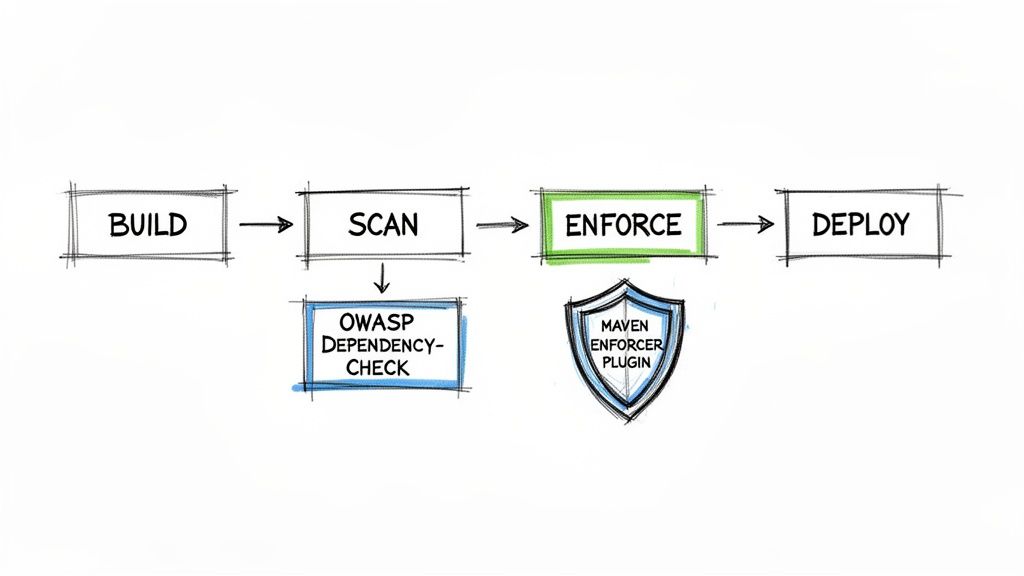
Think of this automation as a gatekeeper that catches problems long before they have a chance to reach production. We’ll focus on two workhorse Maven plugins that form the pillars of this strategy, turning your entire maven dependency tree into a constantly monitored asset.
Scanning for Vulnerabilities with OWASP Dependency-Check
Your first line of automated defence should always be scanning for known vulnerabilities. For this, the OWASP Dependency-Check plugin is the undisputed industry standard. It works by cross-referencing every single artifact in your project—both direct and transitive—against the National Vulnerability Database (NVD) for known Common Vulnerabilities and Exposures (CVEs).
Getting it set up is quite straightforward. Just add the plugin to the <build> section of your pom.xml and bind its check goal to a build phase, usually verify.
<plugin>
    <groupId>org.owasp</groupId>
    <artifactId>dependency-check-maven</artifactId>
    <version>9.0.9</version>
    <executions>
        <execution>
            <goals>
                <goal>check</goal>
            </goals>
        </execution>
    </executions>
</plugin>
With this in place, every time you run mvn verify, the plugin will scan your complete dependency tree and spit out a detailed HTML report. Even better, you can configure it to fail the build if a vulnerability with a certain severity—say, a CVSS score higher than 7.0—is found. This gives you an immediate, non-negotiable backstop against shipping insecure code. Our guide on the OWASP Dependency-Check tool dives deeper into how this fits into a broader security programme.
Enforcing Rules with the Maven Enforcer Plugin
While OWASP Dependency-Check looks for external threats, the Maven Enforcer Plugin is your internal policy gatekeeper. It lets you define a set of custom rules your project must follow, failing the build if any rule is broken. This is where you codify your architectural standards and put a stop to common dependency headaches.
You can set up rules to:
- Ban Specific Dependencies: Blacklist libraries with known bugs, performance issues, or undesirable licences.
- Require Dependency Convergence: Force every module to use the exact same version of a shared dependency, which is a lifesaver in multi-module projects.
- Enforce Version Ranges: Ensure certain dependencies stay within an approved version range to balance stability with security updates.
The Enforcer Plugin is your project’s constitution. It codifies the unwritten rules of dependency management and ensures that every developer—and the CI server—follows them without exception.
For instance, to enforce dependency convergence and ban a notoriously problematic library, your configuration might look something like this:
<plugin>
    <groupId>org.apache.maven.plugins</groupId>
    <artifactId>maven-enforcer-plugin</artifactId>
    <version>3.4.1</version>
    <executions>
        <execution>
            <id>enforce-rules</id>
            <goals>
                <goal>enforce</goal>
            </goals>
            <configuration>
                <rules>
                    <dependencyConvergence/>
                    <bannedDependencies>
                        <excludes>
                            <exclude>commons-logging:commons-logging</exclude>
                        </excludes>
                    </bannedDependencies>
                </rules>
            </configuration>
        </execution>
    </executions>
</plugin>
This simple setup will automatically stop any build that introduces version conflicts or tries to pull in the banned commons-logging library. When you combine these two plugins, you create a powerful, two-layered defence system.
To take it a step further, dedicated dependency update tools like Dependabot and Renovate can really streamline the process. They work alongside these enforcement mechanisms by automatically proposing updates, keeping your project current while your CI pipeline validates that every change is safe and compliant.
From Dependency Tree to a Complete SBOM
Mastering Maven’s dependency tree isn’t just about debugging a tricky build; it’s a vital skill for modern software security and compliance. That clean, structured output from mvn dependency:tree is far more than a diagnostic tool—it’s the raw material for building a Software Bill of Materials (SBOM).
Think of an SBOM as a detailed ingredients list for your application. It’s an exhaustive inventory of every single component, library, and module that makes up your software. This isn’t a “nice-to-have” anymore. For regulations like the EU’s Cyber Resilience Act (CRA), it’s a core requirement. Both regulators and customers are now demanding to know exactly what’s inside the software they use.
Turning Data into a Security Asset
The dependency tree gives you the raw data. The next step is to use specialised tools that can take this output, parse it, and generate a formal SBOM in standard formats like CycloneDX or SPDX. This simple act transforms a text file into a powerful, automated security asset.
For example, a tool like the CycloneDX Maven Plugin can be added to your pom.xml to generate an SBOM automatically during the build process:
<plugin>
    <groupId>org.cyclonedx</groupId>
    <artifactId>cyclonedx-maven-plugin</artifactId>
    <version>2.7.9</version>
    <executions>
        <execution>
            <phase>package</phase>
            <goals>
                <goal>makeAggregateBom</goal>
            </goals>
        </execution>
    </executions>
</plugin>
Once you have a formal SBOM, you can unlock several critical security capabilities:
- Continuous Vulnerability Monitoring: Automated scanners can check your SBOM against global vulnerability databases in real-time. You’ll get an alert the moment a new CVE is discovered in one of your dependencies.
- Licence Compliance: An SBOM tracks the licence of every component, helping you avoid the legal and financial risks that come from accidentally using libraries with restrictive or incompatible licences.
- Streamlined Audits: When an auditor asks for evidence of your software’s composition, a complete SBOM is immediate, verifiable proof of due diligence.
The
mvn dependency:treecommand tells you what is in your project. A formal SBOM organises that data to answer the critical questions of where the risks are and how to manage them over the product’s entire lifecycle.
A Strategic Advantage in a Regulated Market
Ultimately, getting your dependency tree right is about much more than just good engineering hygiene. It’s about building a defensible security posture in a market where supply chain security is no longer optional. A clean tree leads directly to an accurate SBOM, which in turn enables a robust vulnerability management programme.
This capability is a massive strategic advantage. It allows your organisation to ship secure and compliant software with confidence, knowing you have full visibility into your supply chain. If you’re preparing for new regulations, understanding the specific CRA SBOM requirements is the essential next step in turning your dependency data into a cornerstone of your compliance strategy.
Got Questions? We’ve Got Answers
When you’re deep in the trenches of a complex project, dependencies can throw you a curveball. Here are some of the most common questions that pop up when working with the Maven dependency tree, along with practical, no-nonsense answers.
What’s the Real Difference Between dependency:tree and dependency:analyze?
Think of it this way: dependency:tree is your project’s architectural blueprint. It gives you a complete, top-down view of every single library, including the transitive ones pulled in by your direct dependencies. It’s the perfect tool for visualising how everything connects and for tracking down exactly where a specific version conflict is coming from.
On the other hand, dependency:analyze is your quality assurance inspector. It cross-references your pom.xml with your compiled code to find mismatches. Its job is to flag two main problems: dependencies you declared but never actually used, and dependencies you’re using but never declared (because they snuck in transitively). It’s all about making your build cleaner, leaner, and more explicit.
For example, dependency:analyze might report:
[WARNING] Used undeclared dependencies found:
[WARNING]    org.slf4j:slf4j-api:jar:1.7.32:compile
[WARNING] Unused declared dependencies found:
[WARNING]    org.apache.commons:commons-lang3:jar:3.12.0:compile
This tells you to explicitly declare slf4j-api and consider removing commons-lang3 if it’s truly not needed.
How Can I Find Which Dependency Is Pulling In a Vulnerable Library?
This is a scenario every developer faces, and thankfully, Maven has a built-in search function for exactly this purpose. You can use the -Dincludes filter with the dependency tree command to zero in on the artifact causing you trouble.
Let’s say you need to find the source of a problematic log4j-core version. Instead of scrolling through hundreds of lines, you just run this:
mvn dependency:tree -Dincludes=org.apache.logging.log4j:log4j-core
The output will instantly show you the exact dependency path responsible for introducing the vulnerability. From there, you can decide whether to add an exclusion or update the parent dependency that brought it in.
Don’t be fooled by Maven’s
(omitted for conflict)message. It’s not a solution; it’s a symptom. It means Maven made an educated guess to keep your build from failing, but that guess could easily introduce a subtle bug or a major security risk. You need to investigate.
Why Does Maven Keep Saying a Dependency Is “Omitted for Conflict”?
You’ll see this message when your project has multiple paths leading to different versions of the same library. To avoid a complete meltdown, Maven uses a simple rule called “nearest definition.” It looks at the dependency hierarchy and picks the version closest to your project’s own pom.xml, quietly ignoring (or “omitting”) all the others.
While this pragmatic approach keeps things moving, it should always be treated as a warning sign. The version Maven picked might be older and missing a critical security fix, or it could be newer and introduce a breaking change that another part of your application wasn’t expecting. Always dig into these omissions to make sure the version that won is actually safe and compatible for your entire project.
Ready to move beyond spreadsheets and manual checks for CRA compliance? Regulus provides a clear, automated path to prepare for EU regulatory deadlines. Our platform helps you assess applicability, classify products, and generate a tailored requirements matrix, turning complex compliance obligations into an actionable plan. Gain clarity and confidence in placing your products on the European market. Learn more about how Regulus can help.


