

A path traversal attack, sometimes called directory traversal, is a classic web security vulnerability that lets an attacker read—and in some cases, write to—files they should never be able to reach. It’s a simple but powerful trick.
Attackers pull this off by manipulating file paths using the "dot-dot-slash" (../) sequence. Think of ../ as a command to "go up one directory." By stringing these together, they can navigate out of the web application's designated folder and start poking around the server's file system, hunting for sensitive files.
What a Path Traversal Attack Looks Like
Let's imagine a simple e-commerce site that displays product images. A typical URL might look like this: https://example.com/show_image.php?filename=product_image.jpg.
In a properly secured setup, the web application is sandboxed. It’s only allowed to fetch files from a specific folder, like /var/www/images/. But if the application blindly trusts the filename input, an attacker can get creative. They can manipulate that parameter to traverse up the directory tree, breaking out of the intended folder and gaining access to places they don't belong.
For example, an attacker could craft a URL like this one:https://example.com/show_image.php?filename=../../../etc/passwd
If the application is vulnerable, it will dutifully process the ../ sequences, climb three directories up from its current location, and then serve up the contents of the /etc/passwd file. Just like that, the attacker has a list of system users—a major security breach.
The Core Goal: Unauthorised Access
The whole point of a path traversal attack is to get at information that's supposed to be private. Attackers aren't just exploring; they have a shopping list of files that could give them deeper access or expose valuable data.
Their usual targets include:
- Configuration Files: Files like
app.configor.envare goldmines. They often hold database credentials, API keys, and other secrets. A practical example would be an attacker using../../.envto steal database connection strings. - Source Code: Getting their hands on the application's source code can reveal other vulnerabilities, business logic, or hardcoded secrets. An attacker might try to fetch
../app/main.pyto analyze the application logic. - System Files: On a Linux server, a prime target is
/etc/passwd, which contains a list of all user accounts on the system. On Windows, they might targetC:WindowsSystem32configSAMto access password hashes.
A successful path traversal attack is like giving a burglar a master key. Suddenly, they’re not just in the public lobby; they have access to every room in the building—server credentials, user data, and system configurations. It’s often a fast track to a full system compromise.
Impact in the Real World
The consequences of a path traversal vulnerability are severe, ranging from data breaches to a full server takeover and the reputational damage that follows.
This threat is especially critical for manufacturers of IoT and other connected hardware. Failing to protect devices against these attacks can lead to non-compliance with regulations like the EU's Cyber Resilience Act (CRA). You can learn more about how this attack fits into broader security frameworks in our article on the OWASP Top Ten. Regulations like the CRA demand that products are secure by design, making the prevention of path traversal attacks a non-negotiable requirement.
How Path Traversal Attacks Exploit System Weaknesses
At its heart, a path traversal attack is a game of trust—or rather, a betrayal of it. The attack works because an application blindly trusts input from a user. When a system accepts a file path without properly checking it, an attacker can trick it into stepping outside the intended web directory. This is where the simple but devastatingly effective "dot-dot-slash" (../) sequence comes into play.
The whole thing kicks off when a user sends a request for a file, like an image or a document. But instead of a normal filename, the attacker crafts a malicious string. By chaining together ../ sequences, they’re essentially telling the server's file system, "go up one level… now another… now another," until they break free from the web root.
This diagram breaks down the simple, three-step process: an attacker requests a file, uses traversal sequences to climb up the directory tree, and ultimately gets their hands on restricted data.
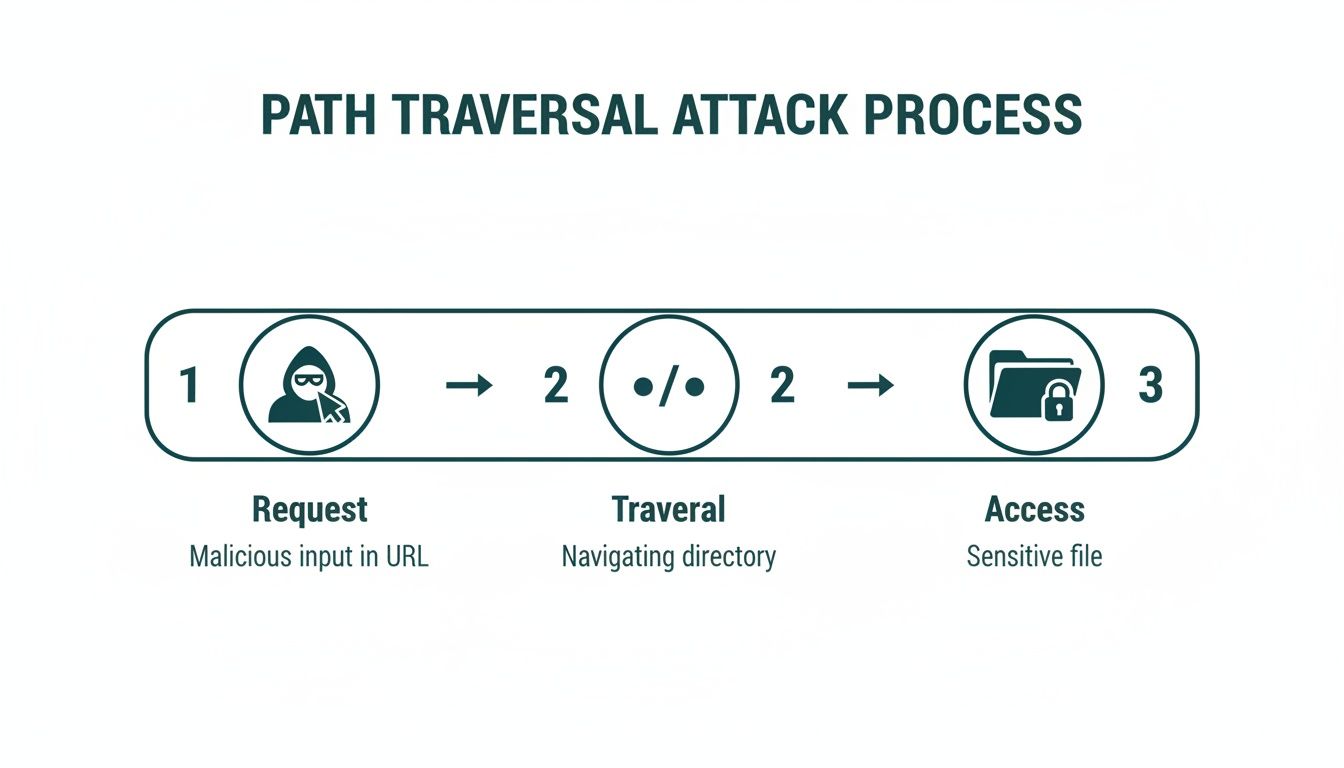
As you can see, the attack’s success depends entirely on the server failing to validate the malicious input. Once that happens, the directory traversal succeeds, and sensitive files are exposed.
Common Entry Points for Attackers
Attackers are always on the lookout for specific spots where user input is used to build file paths. These are often the weakest links in an application’s defences.
Some of the most common targets include:
- File Upload Forms: Many applications let users upload files like profile pictures. If the upload logic isn't secure, an attacker could manipulate the filename to write a malicious script somewhere unexpected on the server. For example, uploading a file named
../../var/www/html/shell.phpmight place a malicious PHP script in the web root. - API Endpoints: Modern apps lean heavily on APIs that take parameters in requests. An endpoint designed to fetch a user's data could be tricked with a path traversal payload to grab system configuration files instead. A request to
GET /api/v1/user_data?file=report.pdfcould be changed toGET /api/v1/user_data?file=../../config/secrets.json. - URL Parameters: Just like in our earlier example, parameters in the URL that point to a file are a prime target. This is one of the most direct and common vectors for a path traversal attack.
In the European Union's cybersecurity landscape, path traversal attacks are a major headache, contributing to 21.3% of incidents traced back to this exact weakness. This statistic is a huge red flag for manufacturers targeting the EU market. Unpatched flaws are a clear invitation for attackers to navigate directory structures and access sensitive files. You can see the full breakdown in the ENISA Threat Landscape report.
Advanced Evasion Techniques
Basic security filters might just look for the literal ../ string. To get around these simple defences, attackers have developed cleverer methods to disguise their malicious input, making the attack much harder to spot.
The real danger of path traversal lies in its adaptability. Attackers don't just use one method; they encode and obfuscate their payloads to slip past weak security checks, turning a simple flaw into a critical breach.
For instance, a simple filter might block ../, but what if the attacker encodes it? URL encoding can transform characters into a percent-encoded format. The . character becomes %2e, so an attacker could use a payload like ..%2e/ to fool a filter that only decodes the input once.
To make their traversal attempts even harder to catch, attackers have a whole bag of tricks. They often mix and match different encoding schemes to bypass filters that aren't thorough enough.
Common Path Traversal Payloads and Their Purpose
| Payload Type | Example | Description |
|---|---|---|
| URL Encoding | ..%2f..%2fetc/passwd |
Uses URL-encoded forward slashes (%2f) to bypass filters that only look for the literal character. |
| Double URL Encoding | %252e%252e%252f |
Encodes the ../ sequence twice. A lazy web application firewall (WAF) might decode it once, see %2e%2e%2f, and let it pass. |
| UTF-8 Encoding | ..%c0%af..%c0%af |
Uses non-canonical UTF-8 encodings for slashes (/) or backslashes ( |
| Null Byte Injection | ../../etc/passwd%00.jpg |
Appends a null byte (%00) to trick the application into terminating the string early, ignoring the legitimate file extension. |
| Path and Dot Truncation | ../../../../boot.ini/.... |
Used against systems that truncate file paths after a certain length or specific character sequences. |
These advanced methods show why simple blocklisting is never enough. A robust security posture demands proper input validation and, critically, path canonicalisation to neutralise these threats before they can do any damage.
Seeing Path Traversal Vulnerabilities in the Wild
Theory is great for understanding what a path traversal flaw is, but seeing it in action really drives home the risk. Looking at vulnerable code snippets and real incidents shows just how easily a simple oversight can snowball into a critical breach. These examples are a blueprint of common mistakes and, more importantly, a clear guide for what secure code ought to look like.
To really get a feel for the danger, let's break down how this vulnerability shows up in common programming languages and even critical infrastructure. These aren't abstract concepts; they’re the kinds of flaws that have led to major data breaches in live systems.
A Vulnerable Python File Reader
Python is a go-to for web backends, so it’s no surprise it’s a frequent target. Imagine a simple web app, maybe built with a framework like Flask, that lets users pull up log files from a specific directory. A developer might quickly write a function that grabs a filename from a URL and serves it back.
Here’s what a dangerously insecure version of that code looks like:
from flask import Flask, request, send_from_directory

app = Flask(__name__)
LOG_DIRECTORY = '/var/logs/app_logs/'

@app.route('/logs')
def get_log_file():
    filename = request.args.get('filename')
    # DANGER: Directly using user input to build a file path
    return send_from_directory(LOG_DIRECTORY, filename)
The fatal flaw is right there in the comment: the application blindly trusts whatever filename the user provides. An attacker can easily craft a request that breaks out of the intended LOG_DIRECTORY.
For example, a malicious request might be as simple as this:https://example-app.com/logs?filename=../../../../etc/passwd
Because the input is never checked or cleaned up, the server would dutifully climb up the directory tree and hand over the contents of the /etc/passwd file. Classic path traversal.
The Secure Python Fix
Fixing this means we have to stop trusting user input and start validating it before it ever touches the filesystem. A secure version of the code makes sure the requested path is legitimate and stays put inside the directory we want.
import os
from flask import Flask, request, abort, send_from_directory
from werkzeug.utils import secure_filename

app = Flask(__name__)
LOG_DIRECTORY = '/var/logs/app_logs/'

@app.route('/logs')
def get_log_file():
    filename = request.args.get('filename')
    if not filename:
        abort(400, "Filename parameter is missing.")

    # Sanitize the filename to remove directory components
    safe_filename = secure_filename(filename)

    # Resolve the absolute path
    base_dir = os.path.realpath(LOG_DIRECTORY)
    full_path = os.path.join(base_dir, safe_filename)

    # Verify the path is legitimate and within the allowed directory
    if os.path.commonpath([full_path, base_dir]) != base_dir:
        abort(400, "Invalid filename provided.")

    return send_from_directory(LOG_DIRECTORY, safe_filename)
This corrected code builds a multi-layered defence. First, it uses secure_filename to strip out nasty characters like path separators. More importantly, it resolves the actual, full path on the server and checks that it's still safely contained within our allowed LOG_DIRECTORY. This simple check effectively shuts the door on the path traversal threat.
Case Study: The Apache HTTP Server Flaw
One of the most high-profile path traversal bugs ever was found in the Apache HTTP Server, one of the most widely used web servers on the planet. Tracked as CVE-2021-41773, this flaw in version 2.4.49 let attackers map URLs to files completely outside the website’s root directory.
The problem was an inadequate path normalisation function. Attackers figured out they could sneak a ../ sequence past security checks by URL-encoding the "dot" character.
A request like
/cgi-bin/.%2e/.%2e/etc/passwdwould slip right past the filter. The server failed to properly decode the URL-encoded.(%2e) before checking the path. This simple encoding trick was all it took for attackers to read any file on the server's filesystem.
It got worse. If the mod_cgi module was turned on, this file-reading bug could be escalated into full-blown Remote Code Execution (RCE). An attacker could go from reading files to running commands on the server with the web server's permissions. The fix, released in version 2.4.50, was rushed and incomplete; it didn't account for double URL encoding, which led to a follow-up vulnerability, CVE-2021-42013.
Path Traversal in IoT Firmware and Cloud Services
The threat of path traversal isn't just for web apps. It’s a huge problem in the world of IoT, embedded firmware, and complex cloud infrastructure.
A great example was a flaw discovered in the AWS Systems Manager (SSM) Agent. This agent is designed to run with high privileges on servers to help automate management tasks. Researchers found a path traversal vulnerability where the agent didn't properly sanitise a "plugin ID" field. An attacker could feed it a malicious plugin ID like ../../../../tmp/malicious_script when telling it to run a command.
Because the input validation was broken, the SSM agent would happily create and run a script in an attacker-controlled location (/tmp/) with root privileges. This is a perfect example of how path traversal can lead to a full system compromise, especially in complex cloud and IoT setups where different components interact with powerful permissions. For a device manufacturer, a similar flaw in firmware could let an attacker overwrite critical system files or plant malware.
Detecting and Preventing Path Traversal Attacks
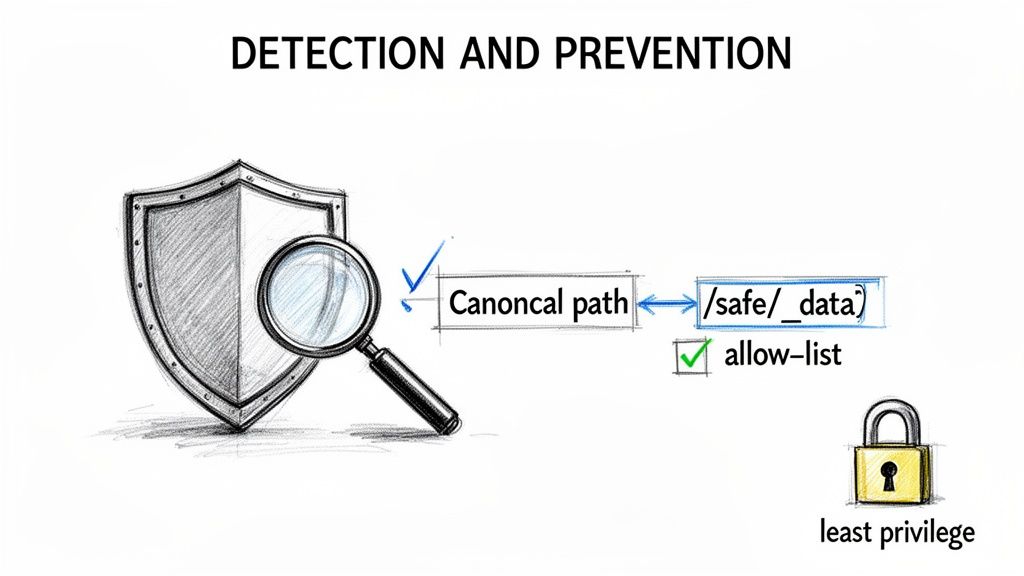
Knowing how a path traversal attack works is one thing; building a defence that holds up is another challenge entirely. A robust strategy is always multi-layered. Simply trying to block "dot-dot-slash" sequences just isn't going to cut it against a determined attacker.
A proactive approach, combining secure coding discipline with rigorous testing, is the only way to find and stamp out these vulnerabilities before they get exploited.
This isn't just good practice; it's a critical business need. In the European Union, sectoral data reveals that path traversal plays a role in a staggering 21.3% of all vulnerability-driven incidents. For industries directly impacted by the Cyber Resilience Act, like transport and digital infrastructure, these attacks are a serious threat.
Adopting Secure Coding Fundamentals
By far the most effective way to stop a path traversal attack is to build security right into your application’s DNA. Prevention is always better than a cure, and that starts with a simple mindset shift: treat every single piece of user input as potentially hostile.
Three core principles should form the bedrock of your defence:
- Strict Input Validation: Never, ever use raw user input in file system operations. The key is to stop thinking about what to block (a block-list) and start defining exactly what is allowed (an allow-list). If a user should only be able to request specific monthly reports, for example, your code should validate their input against a predefined list of legitimate report names like
["january.pdf", "february.pdf"]. Anything else gets rejected. - Path Canonicalisation: Before your application touches a file path, normalise it into its absolute, or canonical, form. This process automatically resolves sneaky traversal sequences like
../, including any weird encoding tricks an attacker might try. Once you have that final, absolute path, you can check if it's still safely within the directory you intended it to be. For example, in Java,new File(userInput).getCanonicalPath()resolves the true path. - The Principle of Least Privilege: Your web application's user account should have the bare minimum permissions it needs to do its job, and not an ounce more. If the application only needs to read files from
/var/www/images, then its permissions should be locked down so it can't read or write anywhere else. In practice, this means running your web server as a non-root user likewww-dataand usingchmodandchownto set strict file permissions. This containment strategy drastically limits the damage an attacker can do, even if they manage to find a flaw.
Path Traversal Mitigation Strategy Comparison
To put these techniques into perspective, here’s a quick comparison of how they fit into your security lifecycle.
| Technique | Primary Goal | Implementation Stage | Effectiveness |
|---|---|---|---|
| Input Validation | Reject malicious or unexpected user input before it is processed. | Code Development (SDL) | Very High |
| Path Canonicalisation | Resolve file paths to their absolute form to prevent trickery. | Code Development (SDL) | High |
| Least Privilege | Limit the application's access to only necessary files/directories. | System Configuration | High |
| SAST/DAST | Automatically find potential vulnerabilities in code or runtime. | Testing & Verification (CI/CD) | Medium to High |
| Penetration Testing | Manually uncover complex flaws that automated tools miss. | Pre-Release & Periodic | Very High |
Each strategy plays a distinct role. While secure coding is your first and best line of defence, a combination of automated and manual testing ensures nothing slips through the cracks.
Practical Testing and Detection Methods
Even with the best coding practices in place, you need to verify that your defences actually work as intended. A healthy mix of automated scanning and hands-on manual testing is the only way to be sure you’ve caught potential path traversal weaknesses.
A strong defence isn't just about writing secure code; it's about actively hunting for weaknesses. Proactive testing turns assumptions into certainties and ensures that your security measures are truly effective against real-world attack techniques.
Automated tools give you a crucial first line of defence, scanning your codebase and running applications for common vulnerability patterns.
- Static Application Security Testing (SAST): Think of SAST tools as a security-focused proofreader for your source code. They analyse your code without running it, spotting dangerous patterns like the direct use of user input in file path functions. For example, a SAST tool would flag the line
return send_from_directory(LOG_DIRECTORY, filename)from our vulnerable Python example as a high-risk security flaw. You can find out more about this technique in our guide to static code analysis. - Dynamic Application Security Testing (DAST): DAST tools take the opposite approach, testing your application while it's live. They act like an automated attacker, throwing malicious payloads—including all sorts of path traversal sequences—at your application's inputs to see how it reacts. A DAST scanner would automatically try requests like
?filename=../../etc/passwdon every parameter it discovers.
But automated tools aren't infallible. They can be noisy, and they sometimes miss nuanced, logic-based vulnerabilities. That's where manual penetration testing by seasoned security pros comes in. A skilled pen tester thinks like an attacker, creatively combining techniques to bypass filters and uncover hidden weaknesses that a scanner would never find.
By weaving both automated scans and expert manual testing into your development lifecycle, you create a comprehensive security net that is far more effective at catching and stopping path traversal attacks.
Path Traversal and the Cyber Resilience Act
A path traversal vulnerability isn't just a technical glitch—it's a direct threat to your regulatory standing. For any company placing products with digital elements on the European market, the EU's Cyber Resilience Act (CRA) elevates this common flaw from a security headache into a major business risk. Ignoring it can lead to eye-watering penalties, including market exclusion and fines running into the millions.
The CRA establishes a new legal baseline for cybersecurity, demanding that products are secure by design and by default. A path traversal flaw is a fundamental breach of this principle. It’s a textbook case of failing to validate user input and secure file system access—core tenets of secure development that the CRA now legally enforces.
Where Path Traversal Violates CRA Obligations
The Act isn't a collection of friendly suggestions; it lays out specific, legally binding obligations for manufacturers. A path traversal vulnerability clashes directly with several of these core requirements.
For instance, the CRA mandates that manufacturers:
- Ensure products are free from known exploitable vulnerabilities. Path traversal is one of the most well-documented and widely understood web security flaws in existence. Shipping a product with this flaw is a clear failure of due diligence.
- Implement security measures to protect the confidentiality and integrity of data. Path traversal directly torpedoes this by letting attackers access sensitive files they should never be able to reach.
- Establish and maintain a robust vulnerability handling process. This means actively finding, reporting, and fixing security flaws in a timely manner.
Leaving a path traversal flaw unpatched sends a clear signal that you're failing to meet these essential criteria. What might seem like a simple coding oversight quickly becomes a critical legal and financial liability. For example, if a path traversal flaw is discovered in your IoT device's firmware update mechanism, it could be used by attackers to block future security patches, directly violating the CRA's requirement to ensure security updates can be delivered securely.
The CRA effectively elevates a path traversal attack from a mere code-level error to a board-level concern. Failing to prevent, detect, and remediate this vulnerability is no longer just poor security practice—it's a direct violation of European law with tangible consequences for market access and revenue.
The Business Impact of Non-Compliance
The financial penalties for CRA non-compliance are designed to hurt. Fines can climb as high as €15 million or 2.5% of a company’s total worldwide annual turnover, whichever is greater. But it doesn't stop there. National surveillance authorities will have the power to order product recalls or even ban a non-compliant product from the EU single market entirely.
This regulatory pressure is amplified by the real-world damage these vulnerabilities cause. Path traversal flaws have helped fuel a volatile ransomware ecosystem in Europe, where a staggering 92% of cases involved both file encryption and data theft, often made possible by directory traversal exploits. For IoT vendors and manufacturers gearing up for the CRA, these numbers, highlighted in the CrowdStrike 2025 European Threat Landscape Report, underscore the urgency of post-market surveillance.
An unpatched path traversal flaw in firmware can be the perfect backdoor for attackers to steal data before deploying ransomware, triggering both a security disaster and a compliance failure. This makes coordinated vulnerability disclosure and reliable update mechanisms completely non-negotiable.
Ultimately, the CRA reframes the entire conversation around vulnerabilities like path traversal. Secure coding, diligent testing, and transparent vulnerability management are no longer optional best practices. They are mandatory requirements for doing business in the EU, with the processes for handling them being a key part of your obligations. You can explore these duties further in our guide to CRA vulnerability handling requirements.
Building a CRA Compliant Vulnerability Management Workflow
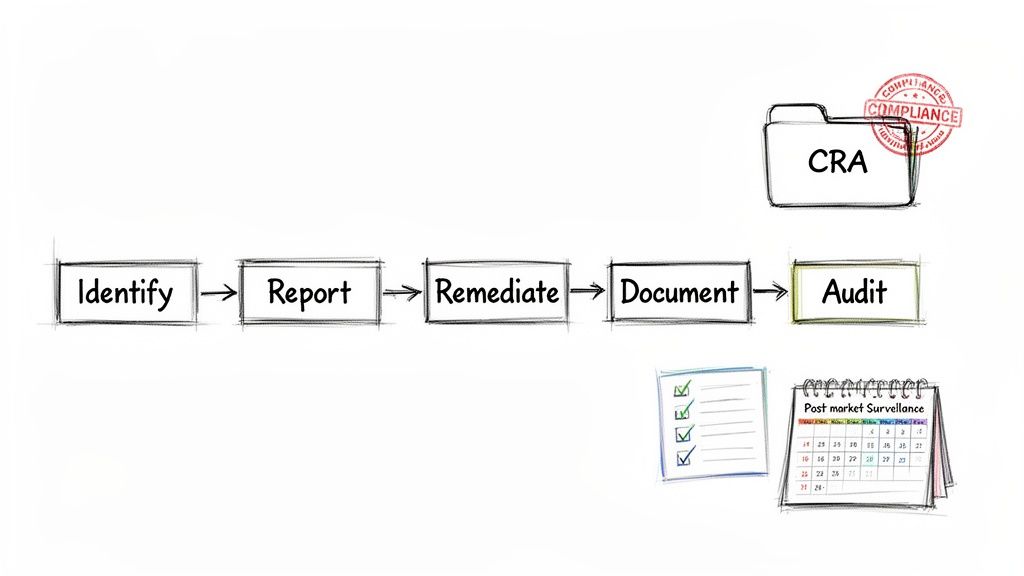
Meeting the Cyber Resilience Act's demands goes far beyond just writing secure code. It calls for a structured, repeatable, and fully auditable vulnerability management process. This is about shifting your organisation from a reactive "fix-it-when-it-breaks" mindset to a proactive workflow that can stand up to regulatory scrutiny.
Ultimately, you need a system for identifying, reporting, and fixing threats like a path traversal attack—one that lets you prove your due diligence to regulators at any time.
Every part of this workflow must be documented, from start to finish. It all begins with having clear, accessible channels for receiving vulnerability reports, whether they come from your internal security teams or external researchers. When a report comes in, especially for a critical flaw, it needs to trigger a well-defined process for triage, risk assessment, and prioritisation. This is how you make sure the most dangerous issues get the attention they need, right away.
The Four Pillars of a Compliant Workflow
To build a robust system that regulators can trust, your process should be organised around four key stages. Think of each step as generating a piece of evidence that becomes part of your technical documentation, proving your commitment to post-market surveillance.
- Identification and Triage: The moment a report lands, the clock starts. This is where you quickly assess its validity and potential impact. Is it a genuine path traversal flaw? Just how bad could it be? For example, a report detailing
?file=../../etc/passwdwould be immediately triaged as high severity. - Reporting and Disclosure: Once validated, the vulnerability has to be reported to the right authorities (like ENISA) within the CRA’s tight 24-hour deadline. You also need a plan for coordinated disclosure with the security researchers who found it.
- Remediation and Patching: This is where your engineering team steps in to develop, test, and roll out a security patch. This entire process must be meticulously tracked, with documentation detailing the code changes that fix the vulnerability’s root cause. A practical example is a commit message that says: "Fix path traversal vulnerability by adding input validation and path canonicalization to the file download endpoint."
- Documentation and Evidence: Finally, you pull everything together. From the initial report to the final patch notes, all activities are compiled into a single, auditable record. This technical file is your concrete proof that you’ve followed a compliant vulnerability handling process.
From Process to Proof
This structured approach does more than just help you manage security; it transforms your day-to-day activities into a defensible compliance record. It’s time to move your team away from chaotic spreadsheets and undocumented fixes and towards a systematic workflow that naturally generates the evidence needed for regulatory audits.
A well-defined vulnerability management workflow is your best defence against non-compliance. It's not just about fixing bugs; it's about creating a transparent, repeatable, and auditable trail of action that proves your product meets the high security standards of the CRA.
By establishing this clear process, you’re not only better prepared to handle a path traversal attack but also building a solid foundation of trust with both your customers and the regulators. To map out your next steps, our detailed Cyber Resilience Act compliance roadmap is a great place to start.
Frequently Asked Questions
When you’re in the trenches with path traversal attacks, a lot of practical questions come up. This section tackles some of the most common ones, breaking down key concepts and offering straightforward advice to help you sharpen your understanding and your defences.
Path Traversal vs Local File Inclusion
Many people use "path traversal" and "Local File Inclusion" (LFI) interchangeably, but there's a subtle yet important distinction. The easiest way to think about it is that path traversal is the technique, while LFI is a specific outcome of using that technique.
-
Path Traversal: This is the core method of using sequences like
../to manipulate a file path and break out of the intended directory. The goal could be anything—reading a file, writing a file, or even executing a script somewhere on the system. -
Local File Inclusion (LFI): This is a specific type of path traversal attack where the attacker’s goal is to trick the application into including and executing a local file. This is especially common in languages like PHP.
For instance, a simple path traversal attack might just aim to read /etc/passwd. An LFI attack, on the other hand, could use the exact same traversal technique to force a PHP application to include a file containing malicious code, potentially leading to Remote Code Execution. For example, a vulnerable PHP URL index.php?page=about.php could be exploited with index.php?page=../../../../var/log/apache2/access.log if the attacker previously managed to inject PHP code into the log file. In short, LFI is a devastating result of a successful path traversal attack.
How to Test an Application for Path Traversal
Testing for these vulnerabilities is critical, but it has to be done safely in a controlled environment. The goal is to find weaknesses without causing any actual damage.
A solid, two-pronged approach usually works best:
-
Automated Scanning: Fire up a Dynamic Application Security Testing (DAST) tool. These scanners will systematically probe your application's inputs—URL parameters, forms, headers—with a huge library of known path traversal payloads, including all sorts of encoding tricks that attackers love.
-
Manual Penetration Testing: Bring in a security team. A skilled pentester can uncover complex, logic-based flaws that automated tools almost always miss. They think creatively, chaining together seemingly minor issues to discover a viable path traversal vector that a scanner would never find. For instance, they might discover a file upload feature that renames files but doesn't check for traversal sequences, allowing them to upload a web shell.
A common mistake is to rely on just one testing method. A DAST scan gives you broad coverage quickly, but a manual pentest provides the depth and human ingenuity needed to find the most cleverly hidden path traversal vulnerabilities.
Does a WAF Prevent All Path Traversal Attacks?
A Web Application Firewall (WAF) is a crucial layer of security, but it’s no silver bullet for path traversal. A WAF works by inspecting incoming HTTP traffic and blocking requests that match known malicious patterns, like the classic ../ sequences.
The problem is, attackers are constantly coming up with new ways to encode their payloads to sneak past these filters. Double URL encoding, using non-standard character sets, and other clever tricks can often bypass a WAF's defences. For example, a WAF might block ../ but fail to block ..%c0%af, a non-canonical UTF-8 encoding for a forward slash that some backend systems will still interpret correctly.
Think of a WAF as a valuable safety net, not a replacement for secure code. The most effective defence is always to fix the vulnerability at its source—right in the application code—by implementing strict input validation and proper path canonicalisation.
Gain clarity on your CRA obligations and build a compliant vulnerability management workflow with Regulus. Our platform provides a step-by-step roadmap to turn regulatory requirements into an actionable plan, helping you confidently place secure products on the European market. Learn more about Regulus

