The CRA security support period is the legally mandated timeframe where you, the manufacturer, must provide free and timely security updates to fix vulnerabilities after your product is on the market. Think of it as a cybersecurity warranty that’s no longer optional. It shifts security from a value-add feature to a fundamental obligation for accessing the EU market.
Defining the Security Support Period Under the CRA

Let’s say you’ve developed a new smart home camera. In the past, you decided how long to provide security patches based on business strategy. The Cyber Resilience Act (CRA) changes that completely. This is now a legal requirement, and the security support period is the core concept defining your long-term commitment to a product’s safety once it’s in a customer’s hands.
This isn’t just about fixing the odd bug. It’s about actively maintaining your product’s defences throughout its expected lifetime. The CRA’s goal is simple: protect consumers from devices that become insecure over time, so they can trust the connected products they buy.
From Feature to Legal Requirement
This is a massive shift for manufacturers. What was once a competitive advantage or a premium service offering is now the baseline for entry into the EU market. Your responsibility doesn’t end when the product is sold; it extends for a defined period afterwards.
Under the CRA, manufacturers are legally bound to address vulnerabilities for a defined period. This transforms post-market surveillance from a best practice into an enforceable duty, ensuring products remain resilient against emerging threats.
Practical Examples of the Support Period
Understanding this is easiest with a few real-world scenarios. The support period you define has to be realistic and defensible, tied directly to how a consumer would reasonably expect to use the product.
- Smart Security Lock: A customer expects a high-end digital lock to secure their home for years. A manufacturer might therefore define a 10-year support period, committing to patching any new software flaws or exploits for a full decade.
- Connected Kitchen Scale: This device has a much lower security risk and a shorter expected lifespan. Here, the manufacturer could reasonably set a 5-year support period—which is the minimum under the CRA, unless an even shorter lifetime can be justified.
- Smart Toy for Children: A connected toy might have a camera or microphone. While its play value might only last a year or two, its potential for privacy invasion means regulators will expect a support period covering its realistic use, likely hitting the 5-year minimum to protect children’s data long-term.
To get a clearer picture of which of your products fall under these new rules, have a look at our guide on the scope of the Cyber Resilience Act. Getting this right sets the foundation for all your other compliance activities.
How to Calculate Your Product’s Support Period

Figuring out your product’s security support period isn’t a guessing game. It’s a strategic decision you have to be ready to defend in front of regulators. The Cyber Resilience Act (CRA) ties this period directly to your product’s ‘expected lifetime’, meaning you need a clear, documented method for calculating how long customers will realistically use it.
This goes far beyond a simple warranty. It requires a hard look at your product’s purpose, value, and place in the market. You are effectively defining the window during which you are legally on the hook for its security.
Factors for Defining Expected Lifetime
To land on a reasonable and compliant expected lifetime, you need to analyse several key factors. This entire process must be documented because it’s a critical part of your technical file and conformity assessment.
Product Purpose and Type: Is your product a core piece of infrastructure or a throwaway novelty? A smart thermostat built into a building’s HVAC system clearly has a longer expected lifetime than a connected party speaker. Practical Example: A smart thermostat is physically installed and expected to function for 10-15 years, so its support period should align with that. A portable Bluetooth speaker might only be expected to last 3-5 years.
Customer Expectations: Put yourself in your customer’s shoes. Someone buying a high-end smart refrigerator rightly expects it to receive security updates for a decade or more, matching its high price tag and long service life. Practical Example: A €3,000 smart fridge should receive updates for its entire useful life (e.g., 10+ years), whereas a €50 smart coffee mug has much lower expectations.
Market Comparisons: What are your competitors doing? Analysing the support periods and lifecycles of similar products helps establish a benchmark for what’s considered standard practice in your product category. Practical Example: If leading brands of smart TVs offer 7 years of security support, offering only the 5-year minimum for your competing model might be hard to justify to regulators.
The core principle is justification. Your support period must be a logical extension of the product’s intended use and market context, not an arbitrary number picked for convenience. A well-reasoned calculation is your best defence during market surveillance.
The CRA also throws in a crucial safety net for consumers. While you should aim for a support period that matches the product’s expected lifetime, the law mandates it must last for at least five years. This rule creates a non-negotiable minimum commitment for most products, ensuring a baseline of long-term security.
Practical Calculation Examples
Let’s apply these factors to a couple of different products to see how their support periods might shake out. This shows how the CRA security support period definition works in the real world.
Connected Holiday Decorations: These have a very specific, seasonal use. A consumer probably expects them to work for a few holiday seasons at most. A manufacturer could justifiably argue for a shorter expected lifetime, perhaps two or three years, but would still be bound by the five-year minimum support requirement.
Industrial IoT Sensor: An IIoT sensor used in a factory to monitor critical machinery is expected to operate reliably for a long, long time. Given its role in operational safety and efficiency, its expected lifetime could easily be 10-15 years, demanding a correspondingly long security support period.
Ultimately, your goal is to arrive at a period you can confidently document and defend. Getting a handle on these calculations is vital, as the clock on these obligations is already ticking. You might want to check out our guide on the upcoming CRA deadlines for 2025-2027.
Your Obligations During the Support Period
Defining your product’s security support period is one thing, but living up to that promise is where the real work begins. Under the Cyber Resilience Act (CRA), this period isn’t a passive warranty—it’s an active, continuous service commitment you owe your customers.
Think of it less like a one-off compliance checkbox and more like a live service agreement for your product’s security. Your responsibilities here aren’t just good practice; they are legal duties that make or break your market access. These obligations are fundamental to what the CRA security support period definition truly means in practice.
Let’s break down exactly what the regulation expects from you day in and day out.
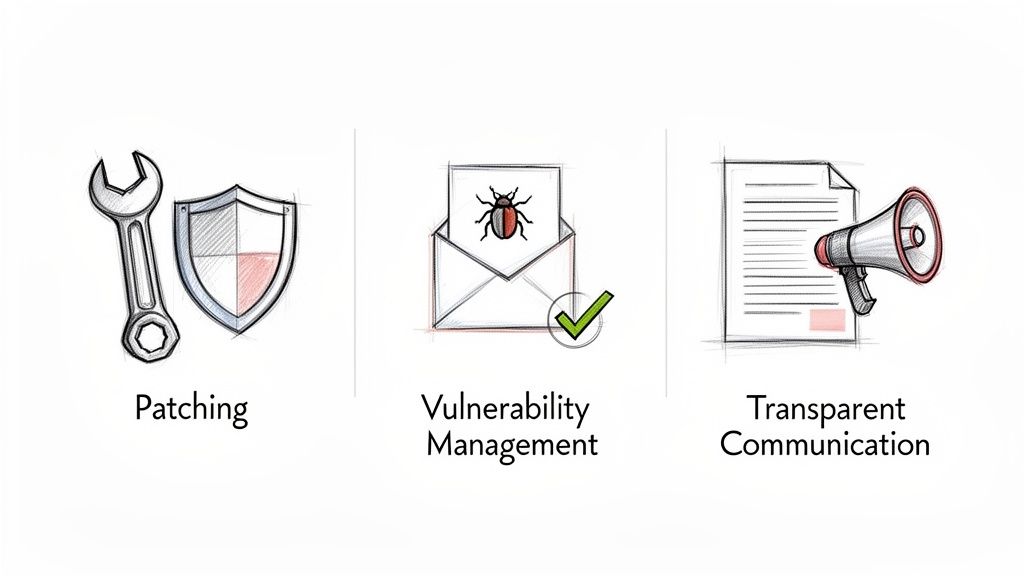
Proactive Patching and Free Updates
Your first and most important job is to hunt down and fix security flaws. The CRA firmly rejects the old, reactive model of waiting for bug reports to trickle in. Instead, you are expected to be on the front foot, actively monitoring your product and its third-party components for emerging vulnerabilities.
When a flaw is found, your obligation is to develop and ship a security update to fix it. Critically, these patches must be provided free of charge and delivered in a way that’s simple for users to install. Long gone are the days of hiding updates behind complex portals or paywalls.
A smart TV manufacturer, for example, must have a system to push an over-the-air (OTA) update automatically to all its devices when a flaw is discovered in its operating system. The user should see nothing more than a simple on-screen prompt to install it.
The CRA’s mandate is clear: security updates must be delivered without delay. This means having a well-oiled machine for patch development, testing, and deployment is non-negotiable for the entire support period.
Structured Vulnerability Management
Alongside your own proactive work, you must build a formal, organised system for handling vulnerabilities that others find and report. This requires a public, secure channel where security researchers, ethical hackers, and even customers can submit potential bugs they’ve discovered.
To give you a clearer picture, here’s a summary of the core obligations that fall under vulnerability management.
Key Manufacturer Obligations During the Security Support Period
This table outlines the main responsibilities manufacturers have throughout the defined support lifecycle of a product with digital elements.
| Obligation Area | Description | Practical Example |
|---|---|---|
| Patch Management | Actively monitor for, develop, and deploy security updates to remediate vulnerabilities. Updates must be free and easy for users to install. | Pushing an automatic over-the-air (OTA) update to a smart home hub to fix a network vulnerability, with a simple in-app notification for the user. |
| Vulnerability Handling | Establish and maintain a secure, public channel for receiving vulnerability reports. This includes processes for intake, verification, and coordinated disclosure. | Creating a “security@company.com” email and a dedicated web form, then acknowledging a researcher’s report within 48 hours and keeping them updated on the fix. |
| Transparent Communication | Clearly state the security support period in product documentation from the moment it is placed on the market. | Including the statement, “This product will receive security updates until at least 31 December 2033” in the user manual and on the product’s online store page. |
| Post-Market Surveillance | Continuously monitor the product in the field for any security-related events or new threats that may not have been present at launch. | Using aggregated, anonymised log data from a fleet of deployed IoT devices to detect anomalous behaviour that could signal a new attack vector. |
Ultimately, these duties work together to create a cycle of continuous improvement and risk reduction, which is exactly what regulators want to see.
Transparent Communication and Documentation
Finally, transparency is a non-negotiable pillar of the CRA. You are legally required to tell your customers exactly how long the security support period will last, right from day one. This information must be clear and easy to find in the product’s documentation, like the user manual, on the packaging, or on its website.
This upfront declaration does two things: it manages customer expectations and serves as your public, legally binding commitment. It empowers buyers to make smarter purchasing decisions, weighing the long-term security of your product against competitors.
For instance, the online listing for a new Wi-Fi router must explicitly state something like, “This product will receive security updates for a minimum of 7 years from the date of purchase.” No ambiguity, no fine print. Just a clear, honest statement.
Managing the 24-Hour Vulnerability Reporting Deadline
When an actively exploited vulnerability hits your product, the clock starts ticking. Loudly. The Cyber Resilience Act (CRA) gives you just 24 hours to report it, turning a bad day into a frantic race against a legal deadline.
This isn’t a suggestion; it’s a mandate. The rule exists to trigger a rapid, coordinated EU-wide response to protect users and critical infrastructure. Without a battle-tested plan, you’re not just risking a security crisis—you’re facing serious penalties and a major blow to your brand.
Understanding the Reporting Triggers
The 24-hour countdown begins the moment you become aware that a vulnerability in your product is ‘actively exploited’. This isn’t about a theoretical weakness found in a lab. It means attackers are actually using the flaw out in the wild to compromise systems.
Practical Example: Your security team discovers forum posts with code showing how to take control of your smart doorbell model by exploiting a specific flaw. This is active exploitation, and your 24-hour reporting clock has just started.
This rapid reporting duty is also triggered by any security incident that has a severe impact on your product’s security, even without confirmed exploitation. Your team needs the skills and authority to assess a situation fast and decide if it hits the threshold for immediate notification.
The moment you learn of an actively exploited vulnerability, you must notify your national Computer Security Incident Response Team (CSIRT) and the European Union Agency for Cybersecurity (ENISA). This is an immediate early warning—not a report you file after you’ve fixed it.
A High-Pressure Incident Timeline
To pull this off, your internal incident response process needs to be flawless. Think about the timeline from the moment of discovery (Hour 0) to the reporting deadline (Hour 24). It’s tight.
Hour 0-2: Initial Triage. Your security team gets an alert—maybe a zero-day exploit. The first two hours are a blur of confirming the vulnerability and hunting for the first pieces of evidence showing it’s being actively used.
Hour 3-12: Impact Assessment. The full incident response team is activated. Their job is to quickly understand the blast radius: which product versions are affected, how many users are at risk, and what the potential damage could be.
Hour 13-20: Drafting the Report. Your compliance lead grabs a pre-approved communication template and starts drafting the initial notification for ENISA and the national CSIRT. The report must be clear, concise, and packed with all known technical details. You can find more on these formal duties in our article on CRA reporting obligations under Article 14.
Hour 21-24: Review and Submission. The draft goes through a final, high-speed review by legal and technical leadership. Then, it’s submitted through the official portal. You absolutely want to submit well before the final hour to avoid any last-minute technical glitches.
This 24-hour reporting requirement will apply sooner than other parts of the CRA. In fact, manufacturers must be ready to report vulnerabilities starting September 11, 2026. You can read more about what you need to be doing to prepare for the Cyber Resilience Act on DLAPiper.com.
Turning this potential chaos into a structured process means preparing now. You need a dedicated incident response team, clear lines of authority, and ready-to-go templates.
The infographic below highlights the pressure-cooker scenario of an actively exploited vulnerability. Once discovered, the clock starts ticking on a mandatory 24-hour reporting window.

This tight deadline alone shows why having a pre-planned incident response process is not just good practice—it’s a core survival skill under the CRA.
Practical Scenarios: Support Period in Action
Let’s move from theory to practice. Seeing how the CRA’s security support period plays out in the real world is the best way to understand the planning, documentation, and long-term commitment it demands from manufacturers.
Scenario 1: The High-Risk Smart Security Camera
Imagine SecureHome, a manufacturer launching a new, high-end security camera with advanced AI features. This isn’t a cheap gadget; it’s a premium product designed to protect a family’s home. Given its critical function and price point, the company determines the product’s expected lifetime is at least 10 years.
SecureHome doesn’t just guess. They formally document this assessment in their technical files, referencing market analysis of similar high-value security systems. Based on this, they commit to a 10-year security support period. This isn’t buried in the fine print; it’s stated clearly on the packaging, in the user manual, and on their website.
The Test in Year Six
Six years after the camera’s launch, a crisis hits. A security researcher finds a serious vulnerability that could let an attacker bypass authentication and view the live video feed. Worse, there’s evidence the flaw is being actively exploited in the wild. The 24-hour reporting clock starts now.
Because they were prepared, SecureHome’s team validates the report and submits its initial notification to ENISA and the relevant national CSIRT in just 18 hours. Their well-rehearsed incident response plan and pre-written templates made all the difference.
In the following two weeks, their engineers develop, test, and deploy a free over-the-air (OTA) security patch to every affected camera. SecureHome turned a potential disaster into a demonstration of competence, precisely because their long-term support obligations were baked into their processes from day one.
Scenario 2: The Standard-Risk Connected Kitchen Scale
Now, let’s look at a different type of product. A company called PreciseKitchen is launching a smart kitchen scale that sends nutritional data to a mobile app. It’s a useful consumer gadget but serves no critical function. It falls squarely into a lower-risk category.
PreciseKitchen analyses the market and concludes a reasonable expected lifetime for this type of device is five years. They decide to set the security support period to the CRA-mandated minimum of 5 years. This decision is justified and documented, with the product’s low cost and non-critical nature as the key rationale.
Planning for End-of-Life
For PreciseKitchen, the game isn’t just about starting support; it’s about ending it gracefully. As the 5-year period nears its conclusion, their focus shifts entirely to transparent communication. They don’t want to leave their users in the lurch.
One year before support ends, they begin a clear notification campaign through the companion app and by email.
- 12 Months Out: An initial heads-up that security updates will stop in one year.
- 6 Months Out: A second reminder about the approaching end of support.
- Final Month: One last alert confirming the exact date security updates will cease.
This proactive communication ensures no one is caught by surprise. By managing expectations so effectively, PreciseKitchen not only meets its legal duties but also preserves customer trust—a valuable asset, even when a product reaches the end of its life.
How to Prepare: Your Action Plan
Right, let’s turn the theory of the CRA support period into a concrete action plan. This isn’t just about ticking boxes; it’s about building a defensible process that protects your customers and stands up to regulatory scrutiny.
Think of this as a practical checklist for your product, security, and legal teams to get on the same page.
Define and Document Your Product’s Lifetime. This is the cornerstone of your support period. You need to formally assess and justify the expected lifetime based on product type, cost, and realistic user expectations. This isn’t a guess; it’s a documented decision that forms the basis for your CRA security support period definition.
Set Up a Public Vulnerability Intake Channel. You must have a clear, public, and secure way for security researchers and users to report potential flaws. This usually means a dedicated email address (e.g.,
security@yourcompany.com) and a web form, prominently displayed on your website’s support page.Stress-Test Your 24-Hour Incident Reporting. Don’t wait for a real crisis. Run a simulation of an actively exploited vulnerability to ensure your team can meet the CRA’s strict notification deadlines. A dry run will quickly reveal any gaps in your response plan. Building this into a structured CRA Compliance Evidence Pack makes the process repeatable and auditable.
To make all of this work seamlessly throughout the support period, you’ll need to embed these activities into your daily operations. Adopting a strong set of DevSecOps best practices is one of the most effective ways to build this continuous security muscle.
Cyber Resilience Act Security Support: FAQs
The concept of a long-term security support period is central to the CRA, but it also raises plenty of practical questions for manufacturers. Let’s tackle some of the most common ones.
What if My Product’s Lifecycle Is Shorter Than Five Years?
The CRA sets a default security support period of at least five years. But what if your product simply isn’t designed to last that long?
An exception exists, but you need to justify it. For example, a disposable smart sensor built for a single event might have a realistic lifetime of only a few months. In this case, you must provide a solid, documented justification for the shorter support period in your technical files. Be prepared for scrutiny—market authorities will examine these justifications to ensure they are reasonable and based on the product’s intended use, not just a desire to cut costs.
Does the Security Support Period Require Me to Add New Features?
No. The obligation is strictly about security, not functionality. During the support period, you are required to provide free and timely security updates to fix identified vulnerabilities.
You have no obligation to release new features or performance upgrades. The goal is to maintain the security of the product as it was when first placed on the EU market, making sure it stays resilient against emerging threats.
The CRA’s focus is on resilience and safety. Your duty is to patch security holes, not to provide free functional enhancements. This keeps the product secure without mandating new product development.
Who Is Responsible if a Vulnerability Is in an Open-Source Component?
You are. As the product manufacturer, you are ultimately responsible for the security of the entire product you place on the EU market. This responsibility covers every single component inside it, including all third-party and open-source software.
The CRA requires you to maintain a Software Bill of Materials (SBOM) and actively monitor your entire software supply chain for new vulnerabilities. If a flaw is found in an open-source library your product uses, it’s your job to integrate the patch and push the security update to your users. Having a clear action plan for these scenarios is a key part of effective regulatory compliance strategies.
Regulus provides a unified platform to help you navigate the Cyber Resilience Act. Generate your tailored requirements matrix, build audit-ready documentation, and turn complex obligations into an actionable compliance plan. Learn how to confidently place your products on the EU market at https://goregulus.com.