Your team already knows logging matters. The problem is that CRA logging retention requirements don’t hand you a neat retention number, a fixed event list, or a model policy you can copy into your technical file and forget.
Most product teams encounter difficulties at this stage. Engineering asks what must be logged on-device versus in the backend. Security asks how long evidence needs to survive to support incident analysis. Legal asks whether a long retention window creates a GDPR problem. Nobody wants to build a logging scheme that is too thin for an audit and too broad for privacy review.
The Cyber Resilience Act makes this harder by being deliberate rather than prescriptive. It expects manufacturers to log security-relevant events and to keep those logs in a way that supports security across the product lifecycle. But it leaves the retention decision to the manufacturer’s judgement, backed by risk assessment and documented reasoning. That flexibility is useful if you know how to use it. It’s painful if you are waiting for a magic number that never arrives.
If you’re still clarifying the wider regulation before writing your logging policy, start with a clear overview of the Cyber Resilience Act basics. Then come back to retention with one goal in mind: build a policy you can defend to auditors, implement in production, and explain to your privacy team without hand-waving.
Part of our guide to all 22 CRA essential requirements in Annex I.
Introduction The Challenge of CRA Logging Compliance
Many teams face the same obstacle at the same point. They’ve accepted that the CRA requires logging, they’ve identified obvious events like failed logins and update failures, and then someone asks the essential question.
How long do we keep the logs?
The regulation doesn’t answer that with a single number. That frustrates engineering teams because implementation needs concrete rules. It frustrates compliance teams because auditors won’t accept “we kept them for a while” as evidence of a controlled process.
Why the ambiguity causes real problems
A vague requirement creates two bad responses.
One is under-retention. Teams keep minimal logs locally, rotate them quickly, and discover during an incident that the useful evidence is gone.
The other is over-retention. Teams keep everything because deleting feels risky, then struggle to justify why personal data in logs remained stored long after its practical security value dropped.
Both failures come from treating retention as a storage setting instead of a compliance design decision.
The CRA doesn’t reward maximum logging. It rewards logging that is relevant, protected, and justified.
What a defensible approach looks like
A workable retention policy does three things at once:
- Supports security operations: investigators can reconstruct a meaningful timeline.
- Supports conformity evidence: you can show that security controls operated as intended.
- Respects data protection limits: stored log data has a defined purpose and a defined end.
That means product teams need more than a checklist. They need a rationale. In practice, the strongest CRA logging retention requirements programme is the one that links event categories, retention windows, storage controls, and review practices back to the product risk assessment.
What Are CRA Logging and Retention Obligations
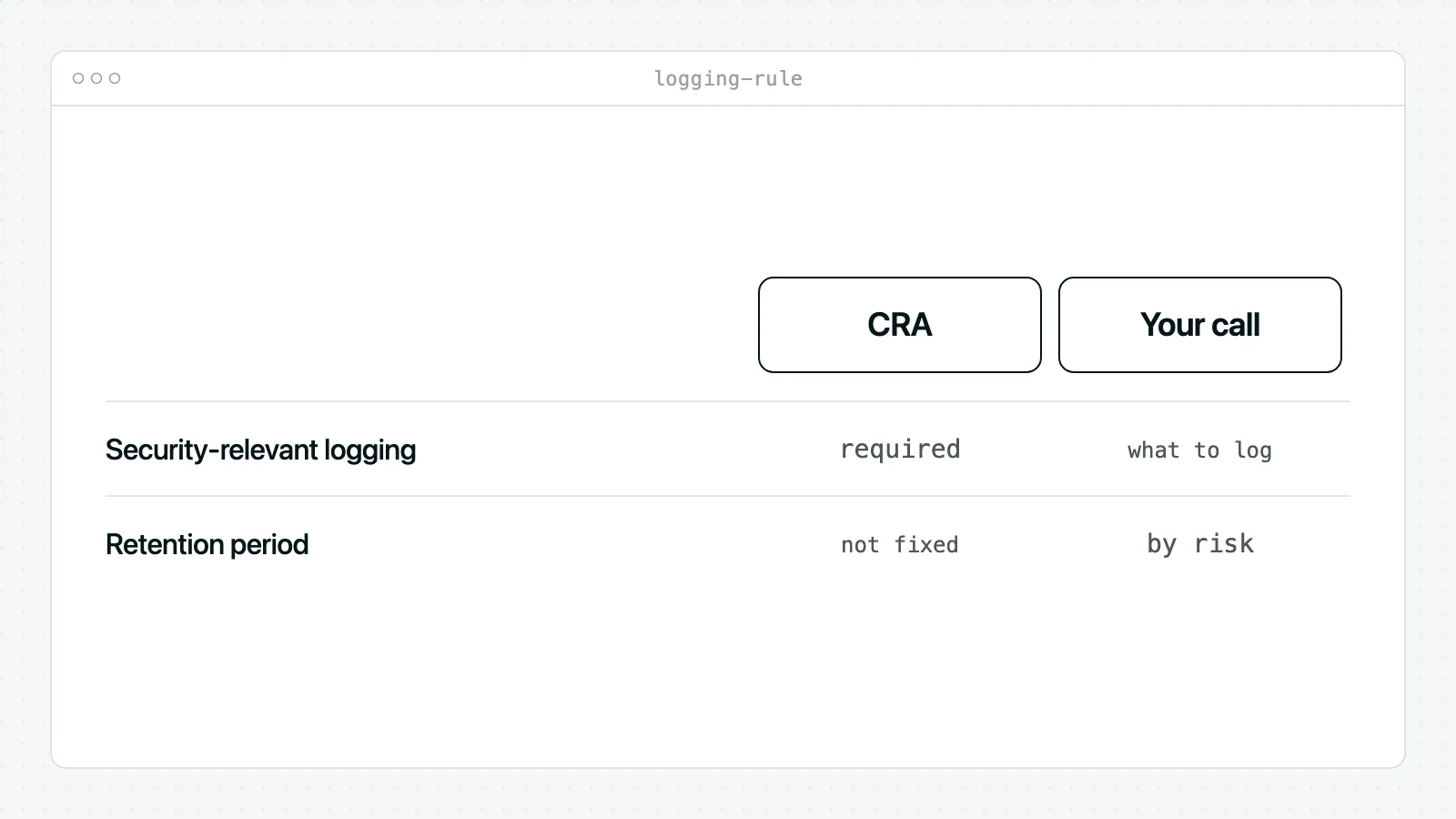
The starting point is straightforward. The CRA requires products to record and monitor security-relevant internal activity. What it does not do is impose one universal retention period for every product and every manufacturer.
What the rule says in practice
The most useful summary is this: the Cyber Resilience Act requires products to record and monitor relevant internal activity, with an opt-out mechanism for the user, but does not prescribe a retention period, so manufacturers determine durations based on their risk assessment and vulnerability handling needs. Getting the essential requirements wrong is not a minor matter: fines can reach 15 million EUR or 2.5% of worldwide annual turnover, whichever is higher. For more on what to record, see our guide on CRA logging and monitoring requirements.
Practical rule: if your retention period can’t be explained by risk, support timelines, and investigation needs, it probably won’t survive scrutiny.
What counts as a security-relevant event
Teams often either log too little or far too much in this area.
A CRA-oriented logging design usually includes events such as:
- Authentication activity: failed administrator logins, account lockouts, API credential failures.
- Authorisation changes: privilege elevation, role assignment, revocation of access.
- Configuration changes: enabling or disabling security features, changing network exposure, altering update channels.
- Update events: update initiated, signature verified, install failed, rollback triggered.
- Security control status: logging pipeline disabled, encryption module error, anomaly detector switched off.
- Remote access activity: support session started, remote command executed, session ended unexpectedly.
For teams working at the implementation layer, a short refresher on understanding syslogs is useful because many CRA logging discussions break down over format and consistency, not just event selection.
What the CRA implies, even when it doesn’t spell it out
The obligation is lifecycle-oriented. Logging isn’t only for runtime application errors. It should cover the phases where product security meaningfully changes:
- Boot and initialisation
- Normal operation
- Updates and patching
- Configuration changes
- Decommissioning or reset events
That matters because many attacks don’t show up as a single “intrusion detected” entry. They show up as a sequence: repeated auth failures, a privilege change, a security feature disabled, then an update rollback.
The biggest myth to drop
There is no single compliant retention number.
A thermostat, an industrial gateway, and the cloud console that manages a connected product won’t always justify the same retention period. The right answer is the one your team can tie to product risk, support obligations, investigation windows, and privacy constraints. That’s why mature teams stop asking, “What’s the CRA number?” and start asking, “What period can we defend?”
Generate the technical file and the declaration of conformity
Regulus builds the nine CRA documents in Word from what you know about your product, and marks what is still missing instead of inventing it. Free for manufacturers.
How to Define Your Log Retention Period
The retention decision should come out of a structured judgement call, not a default setting in a SIEM or cloud storage bucket.
Start with the product risk assessment
If the product risk assessment identifies remote compromise, misuse of privileged interfaces, or update-chain abuse as meaningful threats, your logs need to remain available long enough to investigate those events after discovery.
That sounds obvious, but teams often keep logs based on storage convenience rather than realistic detection timing. A device compromise may not be noticed immediately. A weak retention period can turn a valid logging design into a useless one.
Ask these questions first:
- Which attack paths matter most for this product?
- How late might you discover them?
- Which events would you need to reconstruct the sequence?
- Where do those logs live, and can an attacker delete them?
If you can’t answer those four questions, you’re not ready to choose a retention period.
Align retention with support and vulnerability handling
Retention also needs to fit the product’s support model. If your team promises security updates for years, but your logs disappear quickly, you create a gap between vulnerability handling and evidence preservation.
A practical approach is to split logs into classes instead of forcing one blanket period.
A useful model for log classes
High-value security audit logsThink admin access, permission changes, remote support sessions, firmware validation results, and update outcomes. These usually justify the longest retention because they support both investigations and audit evidence.
Operational security telemetryThink repeated failed authentications, API abuse indicators, service restarts tied to control failures, or policy enforcement events. These often need a meaningful but not indefinite retention window.
Low-value diagnostic noiseDebug traces and verbose runtime events can help engineering, but they rarely deserve long retention in production unless they directly support a documented security need.
Short retention is defensible when the event has short-lived value. It isn’t defensible when the event proves a security control operated or failed.
Factor in technical reality without letting it drive the policy
Embedded and IoT products often have tiny local storage. That limitation is real, but it doesn’t excuse a weak retention design.
The answer is usually architectural, not rhetorical:
- Store a short local buffer for immediate troubleshooting.
- Forward critical events off-device to controlled infrastructure.
- Protect central copies with restricted access and integrity measures.
- Purge by class rather than wiping everything on one timer.
For example, a battery-powered sensor might keep only a brief local ring buffer, while forwarding authentication failures, secure boot issues, and update events to a backend system. A desktop software product might log locally for supportability and also send selected security events to a central platform.
Build the rationale you’ll later need to show
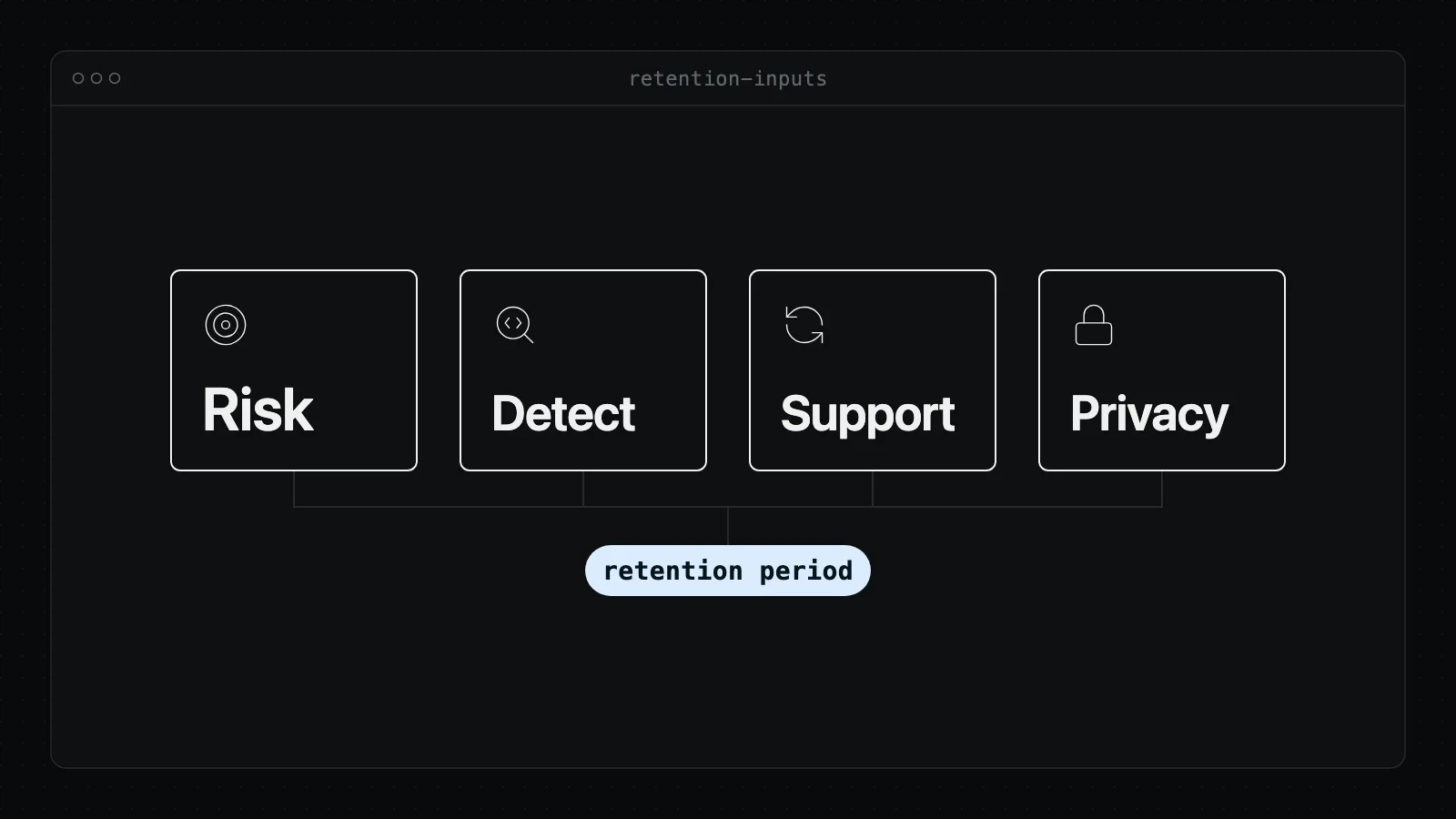
A defensible retention period normally reflects several inputs at once:
| Decision input | What to examine | What it changes |
|---|---|---|
| Product risk | Likely threats and impact | Which events need the longest retention |
| Investigation needs | How incidents are detected and analysed | Minimum useful look-back window |
| Support model | Patch and vulnerability handling lifecycle | How long audit trails remain relevant |
| Product architecture | On-device vs central logging | Feasible storage pattern |
| Data protection | Presence of personal data in logs | Minimisation, masking, and deletion rules |
What usually works and what usually fails
What works:
- Different retention by log category
- Centralising critical events
- Linking retention to documented risk
- Reviewing the policy when the product or threat model changes
What fails:
- One retention period for every event type
- Keeping logs only on the device
- Using vendor defaults without documented reasoning
- Treating GDPR as a reason not to log anything useful
The right retention period isn’t the shortest one your systems can handle or the longest one legal will tolerate. It’s the one your team can justify, operate, and consistently enforce.
Practical Logging Examples for IoT and Software
A connected thermostat is a good test case because it combines embedded firmware, cloud services, a mobile app, and remote administration. If your logging design works there, it will usually scale to other connected products.
The key is to log the events that answer four forensic questions: what changed, who caused it, when it happened, and whether the security control succeeded.
Example one for boot and initialisation
On a connected thermostat, secure boot is part of the trust chain. If firmware validation fails and you don’t log it, you lose one of the most valuable indicators of tampering.
Useful entries might look like this:
firmware_signature_validationDevice ID, firmware version, result, reason code, timestamp.
boot_mode_changeDevice ID, previous mode, new mode, actor if known, timestamp.
factory_reset_triggeredDevice ID, trigger source, success or failure, timestamp.
A weak implementation logs only “device started”. A stronger implementation records whether the integrity check passed and whether the product entered a fallback mode.
Example two for runtime operation
Runtime security logs should focus on actions that change trust, access, or security state.
For the thermostat:
- Failed login to installer account
- New device pairing request
- Mobile app token rejected
- Admin role granted to support user
- Logging service disabled or restarted
- Rate limit triggered on control API
For a software product, the same logic applies with different event names:
- Admin console login failure
- API key revoked
- MFA challenge failed
- Tenant security setting changed
- Privileged export initiated
- Audit log access requested
If an event would matter during a breach review, it probably deserves a structured log entry, not a generic application message.
Example three for updates and remote access
The CRA places obvious weight on secure updates, so update logging needs to be specific enough to prove what happened.
For the thermostat:
- update_download_started
- update_signature_verified
- update_install_failed
- rollback_executed
- remote_support_session_started
- remote_support_command_executed
What doesn’t work is a single line saying “update error”. Engineering may know what that meant at the time. An auditor or incident responder reading the logs months later won’t.
CRA Log Categories and Retention Considerations
| Log Category | Example Events | Primary Purpose | Retention Driver |
|---|---|---|---|
| Secure boot and initialisation | Firmware signature validation, boot mode change, factory reset | Integrity verification and forensic reconstruction | Need to prove trusted start-up and investigate tampering |
| Authentication and access | Failed admin login, token rejection, lockout, password reset | Detect misuse and investigate unauthorised access | Time needed to spot abuse patterns and reconstruct account activity |
| Authorisation and configuration | Role change, ACL change, logging disabled, security setting modified | Audit trail for security posture changes | Need to prove who changed security-relevant settings |
| Updates and patching | Update start, signature verification, install success or failure, rollback | Evidence of secure update process | Support window and vulnerability handling needs |
| Remote access and support | Session started, command executed, session ended, support credential use | Accountability for high-risk administrative actions | Investigation of privileged intervention |
| Security control health | Encryption module error, alerting disabled, telemetry queue failure | Verify controls are functioning | Need to detect blind spots in security monitoring |
A simple example policy split
For a connected product team, a practical split often looks like this:
- Keep short-lived local diagnostic logs on the device for troubleshooting.
- Keep central security audit logs longer because they support incident investigation and compliance evidence.
- Purge or compress low-value verbose logs quickly once they no longer serve a security purpose.
For a software vendor, the equivalent is usually a central audit log stream for admin and security events, with separate short-lived debug logging for engineering support.
That distinction matters. Auditors care far more about retained evidence of security-relevant actions than they do about your ability to replay every harmless application event ever generated.
Documenting Retention in Your Technical File
Implementation alone won’t carry you through a conformity review. You need to show that the logging design was intentional, risk-based, and controlled.
That means writing the retention logic into the technical documentation rather than leaving it buried in infrastructure settings or SOC runbooks. If you need a reference point for where this belongs, use a structured CRA technical file structure and place logging evidence where it connects clearly to risk assessment, security controls, and post-market surveillance.
What auditors will expect to see
Your documentation should answer five questions plainly:
- Which events are logged
- Why those events are considered security-relevant
- How long each category is retained
- How the logs are protected against tampering or unauthorised access
- Which assessment or risk input justified the retention period
A common mistake is writing a one-line statement such as “security logs are retained in accordance with policy”. That says nothing useful. It doesn’t identify scope, classes, ownership, review triggers, or protection methods.
Sample wording you can adapt
Use language that ties the control to the product and the risk assessment. For example:
The manufacturer records security-relevant events across the product lifecycle, including authentication, authorisation, configuration changes, software and firmware update outcomes, remote administrative actions, and security control failures. Log selection is derived from the product cybersecurity risk assessment and supports detection, investigation, vulnerability handling, and post-market monitoring.
Then add the retention logic:
Log retention periods are assigned by event category. High-value security audit logs are retained for a period justified by incident investigation needs, product support obligations, and post-market surveillance requirements. Lower-value diagnostic logs are retained for shorter periods where they support troubleshooting but are not required as enduring security evidence.
Then document protection measures:
Security logs are stored with restricted access, integrity protections, and separation from standard user-accessible storage where feasible. Access to log data is role-based and administrative access to log repositories is itself auditable.
Where to place this in the file
Don’t hide retention in a generic IT policy appendix.
Place it in the parts of the technical file that support these compliance themes:
Logging architecture description
Describe on-device logs, backend collection, central storage, and integrity controls.
Security control implementation
Map event categories to product functions such as login, update, configuration, and remote support.
Risk assessment linkage
Reference the threat scenarios that drove the event list and retention choices.
Post-market surveillance
Explain how retained logs support incident analysis, vulnerability handling, and reassessment after field events.
What good documentation looks like
Good documentation is specific and testable.
It names the event classes. It states who owns the policy. It defines review triggers such as major architectural change, new remote access capability, or updated threat assumptions. It also states how deletions happen so retention isn’t merely aspirational.
Weak documentation is abstract. It speaks about “appropriate retention” without showing what appropriate means for this product.
Navigating the Overlap with GDPR and NIS2
This is the part that usually triggers the longest internal meetings. Security wants enough evidence to investigate incidents properly. Privacy wants to avoid retaining personal data in logs longer than necessary. Both concerns are legitimate.
The answer isn’t choosing one regime over the other. It’s designing logs so the CRA purpose is met with the least intrusive data model that still preserves security value.
Sources of Tension
The CRA pushes manufacturers to preserve security-relevant evidence. GDPR pushes organisations to minimise personal data and limit storage. Those aren’t contradictory obligations, but they do force discipline.
For example, a raw log entry might include a username, device identifier, support agent action, and timestamp. That may be necessary for accountability. But storing full payload contents, free-text user inputs, or unnecessary identifiers in the same log often isn’t.
A good rule is simple: keep the fields needed to investigate the security event, and strip the fields that only add convenience.
Practical ways to reconcile the two
Minimise at collection time
Don’t wait until the privacy review to discover that logs include more than they should. Define allowed fields before engineers instrument the event.
Examples:
- Keep account ID, not full profile details.
- Keep event result and reason code, not sensitive payload content.
- Keep device identifier, not unrelated customer metadata.
Use pseudonymisation where feasible
If your security team can still investigate effectively with a tokenised or pseudonymised identifier, that often gives you a better balance than storing direct identifiers everywhere.
Separate security logs from support notes
A support platform often accumulates free-text context. A security log should be far more controlled. Mixing them creates avoidable GDPR exposure.
Privacy-aware logging is not weaker logging. It is more disciplined logging.
Where NIS2 enters the picture
NIS2 and CRA don’t apply to exactly the same actors, but they often touch the same operating environment. A manufacturer that builds strong product logging under the CRA gives operators better visibility when those products sit inside regulated environments.
That overlap matters operationally. If a customer asks whether your product can surface authentication failures, update anomalies, or remote administration events in a way that supports their own obligations, your CRA logging design becomes part of the answer.
The practical takeaway is this: write one coherent logging policy model that can support product compliance, privacy review, and customer security expectations, instead of treating them as separate projects.
An Evidence Checklist for CRA Audits
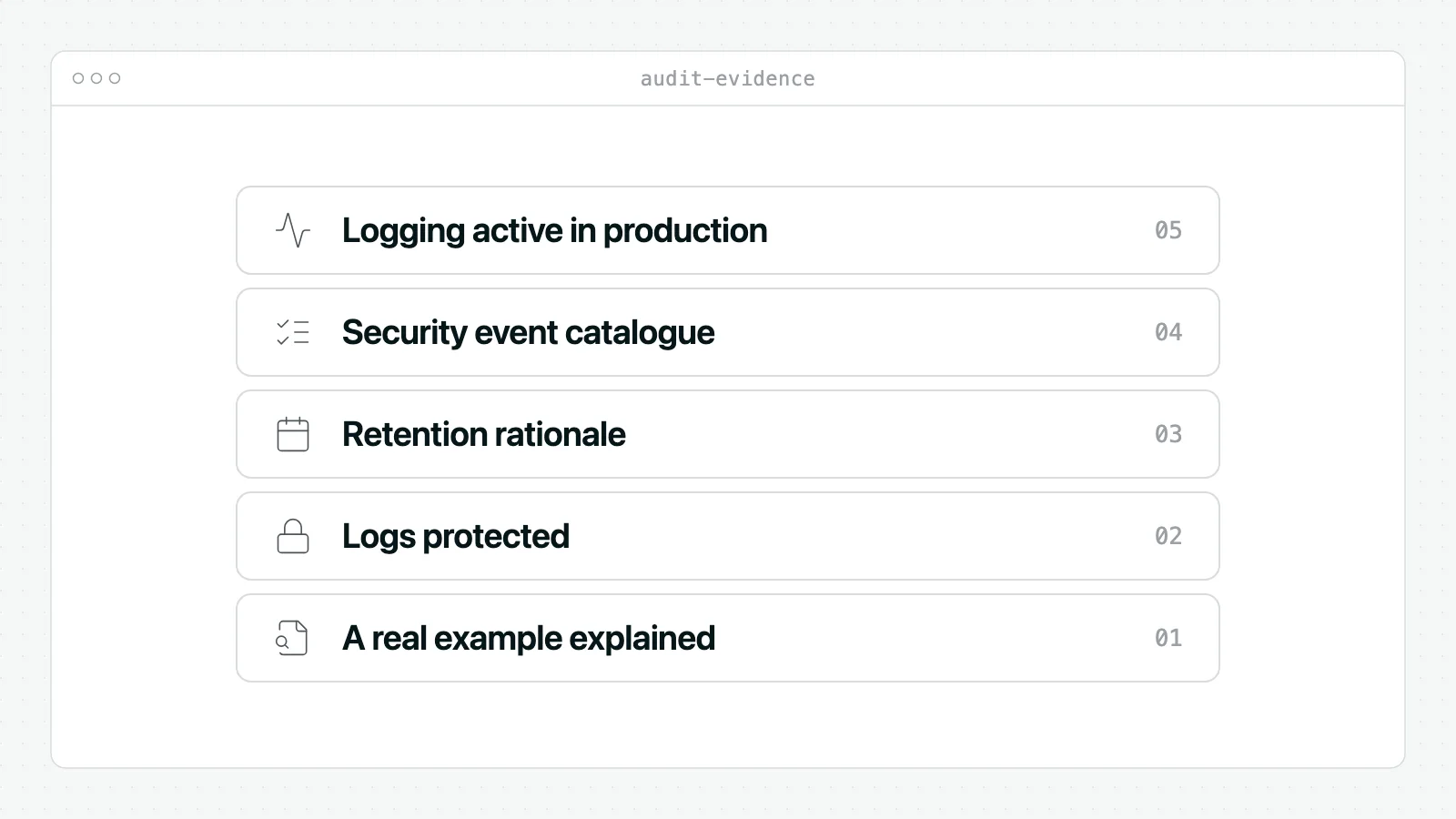
A logging policy becomes real when you can prove it is active, protected, and followed. That is what audit preparation should focus on.
If you build a formal review pack, a structured CRA compliance evidence pack helps organise artefacts before a notified body or internal assessor asks for them.
Question one: Can you show logging is active on a production-representative product?
Good evidence includes:
- Screenshots or exports from a test or staging device configured like production
- Sample log records for key security events
- Configuration records showing logging is enabled by default or appropriately enabled in deployment
Weak evidence is a design document without actual output.
Question two: Can you show which events are considered security-relevant?
Good evidence includes a controlled event catalogue that maps product functions to loggable events.
Examples:
- Authentication and access events
- Privilege and configuration changes
- Update and rollback events
- Security control failures
- Remote administrative actions
A spreadsheet can work if it is maintained. A product requirement, test case set, or architecture decision record can also work. What matters is traceability.
Question three: Can you show how the retention period was decided?
Many teams stumble at this point.
Good evidence includes:
- A written retention policy by log category
- References to the risk assessment that justified the period
- Notes showing alignment with investigation needs and support lifecycle
- Approval history from security, engineering, and privacy or legal where relevant
Bad evidence is “default retention in the logging platform”.
Question four: Can you prove logs are protected?
Show concrete controls, such as:
- Access restriction: only authorised roles can view or manage security logs.
- Integrity protection: append-only handling, cryptographic validation, or equivalent technical measures.
- Segregation: security logs are not casually editable from normal product interfaces.
- Auditability: access to log repositories is itself logged.
Question five: Can you demonstrate the policy is followed in operation?
This requires operational evidence, not just policy text.
Useful artefacts include:
- Retention configuration exports
- Automated purge or archival job records
- Review records for failed logging pipelines
- Test evidence showing a retained event can still be retrieved within policy
An auditor is not only asking whether you wrote the rule. They are asking whether the product and the organisation behave according to it.
Question six: Can your team retrieve and explain a real example?
Prepare one or two worked examples.
For instance:
- A failed admin authentication sequence
- A firmware update failure followed by rollback
- A remote support session that changed a configuration setting
Show the event path, where the logs were stored, who could access them, and how long they were retained under policy. Teams that can walk through a specific example usually do better than that only present abstract controls.
Conclusion Moving Beyond Compliance to Resilience
The hardest part of CRA logging retention requirements is accepting that the regulation won’t choose the retention period for you. That isn’t a gap to work around. It is the design challenge the CRA hands back to the manufacturer.
The teams that handle this well don’t chase a mythical universal number. They identify security-relevant events, classify logs by value, route critical evidence off-device when necessary, document retention by category, and tie every major choice back to product risk and lifecycle support.
That approach does more than satisfy auditors. It makes incident response faster, post-market surveillance more credible, and engineering decisions easier to defend. A retained log is not just a compliance artefact. It is often the difference between “we think this happened” and “we can prove what happened”.
There is also a wider operational upside. Teams that already invest in observability usually adapt faster because they understand that trustworthy telemetry supports both resilience and release quality. If your engineering group is working on that broader capability, this guide on how to boost reliability through observability practices is a useful complement to the compliance lens.
The practical standard is simple. Log what matters. Protect it properly. Keep it for a period you can justify. Delete it when the justification ends.
That is what a defensible CRA position looks like. It is also what mature product security looks like.
Regulus helps manufacturers, software vendors, and IoT teams turn CRA ambiguity into a structured compliance workflow. If you need a faster way to classify your product, walk through the Annex I requirements, generate the Annex VII technical documentation and keep vulnerability handling on track, explore Regulus.