

Secure SDLC (Secure Software Development Lifecycle) is a development framework that embeds security controls into every phase of the software life cycle, from requirements to post-release maintenance.
Instead of treating security as a final penetration test, Secure SDLC ensures that vulnerabilities are prevented early through practices such as threat modeling, secure coding standards, automated testing, dependency scanning, and vulnerability handling processes.
In this guide, you will learn:
- The key phases of a Secure SDLC and what to implement in each one
- A practical Secure SDLC checklist you can apply immediately
- What a Secure SDLC policy should include for engineering teams
- How Secure SDLC aligns with regulatory expectations like the EU Cyber Resilience Act (CRA)
Secure software development life cycle practices are now essential for building compliant digital products under the CRA.
| SDLC Phase | Key Security Activities |
|---|---|
| Requirements | Security requirements, threat modeling |
| Design | Architecture risk review, abuse cases |
| Development | Secure coding, SAST, secrets scanning |
| Testing | DAST, fuzzing, penetration testing |
| Release | Hardening, security sign-off |
| Maintenance | Vulnerability handling, patch management |
A mature secure software development life cycle reduces vulnerabilities across design, development, testing, and maintenance.
What is a Secure Software Development Life Cycle?
Secure SDLC (Secure Software Development Lifecycle) is a structured development approach that integrates security controls into every phase of the software lifecycle, from requirements gathering to post-release maintenance.
Instead of treating security as a final penetration test before launch, Secure SDLC ensures that risks are identified early and mitigated continuously. This proactive model reduces vulnerabilities, lowers remediation costs, and strengthens compliance readiness.
A Secure SDLC typically includes:
- Security requirements defined at the planning stage
- Threat modeling during system design
- Secure coding standards during development
- Automated security testing in CI/CD pipelines
- Dependency and supply chain security controls
- Formal security validation before release
- Ongoing vulnerability management after deployment
By embedding these practices into engineering workflows, organizations build resilient software products that meet both industry best practices and regulatory expectations.
Most organizations implement a secure software development life cycle to meet both security-by-design and regulatory expectations.
Secure SDLC Checklist
The following checklist provides a practical reference for implementing a Secure SDLC program.
1. Requirements Phase
- Define security and privacy requirements
- Identify regulatory obligations (e.g., CRA, NIST SSDF)
- Perform initial risk assessment
- Define secure architecture principles
2. Design Phase
- Conduct threat modeling
- Perform architecture risk review
- Define secure data flows and trust boundaries
- Document security controls
3. Development Phase
- Enforce secure coding standards
- Implement peer code reviews
- Run SAST in CI/CD
- Scan for secrets and misconfigurations
4. Dependency & Supply Chain Security
- Perform Software Composition Analysis (SCA)
- Generate and maintain an SBOM
- Track third-party component risks
- Monitor upstream vulnerabilities
5. Testing Phase
- Run DAST and automated security testing
- Conduct penetration testing (as appropriate)
- Validate authentication, authorization, and input handling
- Fix critical and high-risk findings before release
6. Release Phase
- Perform security sign-off
- Validate hardening configurations
- Document security evidence for compliance
7. Post-Release / Maintenance
- Maintain a vulnerability disclosure process
- Monitor for newly disclosed CVEs
- Patch critical issues within defined SLAs
- Maintain security documentation
This checklist can serve as the foundation for a Secure SDLC policy or compliance framework.
Secure SDLC Policy Template
A Secure SDLC policy formalizes security responsibilities across engineering teams. Below is a structured template outline.
1. Purpose
Define the objective of integrating security controls throughout the development lifecycle to reduce risk and ensure compliance.
2. Scope
Specify which products, teams, repositories, and environments are covered.
3. Roles and Responsibilities
- Engineering teams implement security controls
- Security team defines standards and reviews high-risk changes
- Product owners ensure security requirements are captured
4. Mandatory Controls
Requirements
- Security requirements must be documented for all new features.
Design
- Threat modeling is required for new architectures or major changes.
Development
- SAST must run on all pull requests.
- Critical vulnerabilities must be resolved before merge.
Dependencies
- All releases must include an up-to-date SBOM.
- Known critical third-party vulnerabilities must be remediated prior to release.
Testing
- Security testing must be integrated into CI/CD.
- Penetration testing is required for high-risk products.
Release
- Security approval is required before production deployment.
Maintenance
- A public vulnerability disclosure mechanism must exist.
- Critical vulnerabilities must be patched within defined timelines.
5. Documentation and Evidence
All activities must be documented and retained for audit and regulatory review.
Example Secure SDLC Policy Statements (Ready to Use)
The following controls can be copied directly into an internal Secure SDLC policy:
- All repositories must enforce branch protection and mandatory peer review.
- SAST scanning must run on every pull request, and critical findings must be resolved before merge.
- All releases must include an up-to-date Software Bill of Materials (SBOM).
- Known critical third-party vulnerabilities must be remediated prior to production deployment.
- Authentication and authorization changes require dedicated security review.
- Security testing (DAST or equivalent) must be executed before every major release.
- A documented vulnerability disclosure channel must be maintained for all products.
- Critical vulnerabilities must be patched within defined timelines consistent with CRA obligations.
- Secure update mechanisms must be supported for the full product support period.
- Secure SDLC evidence (threat models, scan reports, patch records) must be retained for conformity assessments.
Secure SDLC Frameworks Compared
Several established frameworks provide structured guidance for implementing a Secure Software Development Lifecycle. While they share common principles, their focus and regulatory alignment differ.
Understanding these differences helps organizations select the right foundation for both security maturity and compliance obligations such as the EU Cyber Resilience Act (CRA).
| Framework | Primary Focus | Strengths | Regulatory Alignment |
|---|---|---|---|
| OWASP SAMM | Application security maturity model | Practical maturity levels, strong AppSec guidance | Medium |
| Microsoft SDL | Secure development process integration | Detailed engineering practices, enterprise-ready | Medium |
| NIST SSDF (SP 800-218) | Secure software development practices | Clear control-based structure, audit-friendly | High |
| ISO/IEC 27034 | Application security within ISO ecosystem | Formal governance and documentation approach | High |
OWASP SAMM
OWASP SAMM (Software Assurance Maturity Model) provides a structured way to assess and improve application security maturity. It is particularly useful for organizations that want to benchmark their current state and define a roadmap toward stronger AppSec practices.
However, SAMM focuses more on maturity progression than on direct regulatory compliance mapping.
Microsoft SDL
Microsoft’s Security Development Lifecycle integrates security requirements directly into development workflows. It emphasizes threat modeling, secure coding practices, and security testing gates.
While widely respected, SDL is primarily a process model and may require additional documentation layers to satisfy regulatory evidence requirements.
NIST Secure Software Development Framework (SSDF)
NIST SSDF (SP 800-218) provides a control-oriented framework structured around practices such as preparing the organization, protecting software, producing secure software, and responding to vulnerabilities.
Because of its control-based structure and traceability, SSDF aligns well with regulatory expectations, including security-by-design and vulnerability management requirements under the CRA.
ISO/IEC 27034
ISO/IEC 27034 focuses on application security within broader ISO governance systems. It is well-suited for organizations already operating under ISO 27001 or related standards.
Its strength lies in formal documentation, governance struct
Secure SDLC and CRA Mapping
The EU Cyber Resilience Act (CRA) requires manufacturers of digital products to implement security by design and by default. A properly implemented Secure SDLC directly supports compliance with these obligations.
Below is a simplified mapping:
| Secure SDLC Practice | CRA Alignment |
|---|---|
| Security requirements definition | Annex I essential cybersecurity requirements |
| Threat modeling | Risk-based security approach |
| Secure coding standards | Secure development obligation |
| SCA + SBOM generation | Supply chain transparency requirements |
| Vulnerability handling process | Annex I Section 2 vulnerability management |
| Security documentation | Technical documentation obligations (Annex II & VII) |
Implementing a Secure SDLC helps organizations:
- Demonstrate security-by-design compliance
- Produce structured technical documentation
- Maintain traceable evidence for conformity assessments
- Reduce risk of post-market non-compliance
For organizations placing products on the EU market, Secure SDLC is not only a best practice but a foundational compliance mechanism under the CRA.
Why a Secure SDLC Is No Longer Optional
Imagine constructing a high-rise building. Would you wait until all twenty floors are up before thinking about crucial earthquake-proofing? Of course not. The structural integrity has to be baked into the initial blueprint. A traditional SDLC often treats security like this afterthought—a frantic, last-minute inspection before launch, which is both incredibly expensive and surprisingly ineffective.
A secure software development life cycle completely flips this model on its head. It integrates security activities into every phase of development:
- Requirements: Teams don’t just ask, “what should this product do?”. They also ask, “how could this be attacked?”. For example, a requirement for a banking app would shift from “the user can transfer funds” to “the system must verify multi-factor authentication before initiating a fund transfer over $500.”
- Design: Architects proactively model threats to find weaknesses before a single line of code is ever written. A practical example is designing a password reset flow to use expiring, single-use tokens sent to a verified email, preventing token reuse attacks.
- Implementation: Developers are guided by secure coding standards to stop common vulnerabilities from ever making it into the codebase. This could mean using parameterized queries in the code to prevent SQL injection, rather than concatenating strings to build a database query.
- Testing: Security testing becomes a continuous activity, not just a panicked scramble in the final days before release. For instance, an automated security scan is triggered in the CI/CD pipeline every time a developer pushes new code, catching potential issues in minutes.
This proactive approach simply creates more resilient and trustworthy products.
The Business Case for Building Security In
Beyond just building better software, a secure SDLC delivers clear, undeniable business value. For starters, it dramatically reduces the cost of fixing vulnerabilities. The financial impact is staggering: fixing a security flaw early in the development process costs an estimated $80 per fix. That figure balloons to a massive $7,600 when the same flaw is discovered after the product is already in production. You can discover more insights about regulatory security obligations on Telefónica Tech.
By integrating security from the start, you are not just preventing breaches; you are protecting your brand’s reputation, building customer trust, and avoiding the astronomical costs of post-launch remediation.
On top of that, this methodology isn’t just a best practice anymore. For many organisations, it’s now a legal requirement. New regulations like the EU’s Cyber Resilience Act (CRA) explicitly mandate ‘security-by-design’ principles. Adopting a secure SDLC is the most effective way to streamline compliance, avoid hefty penalties, and ensure your products can legally enter the market. It transforms security from a cost centre into a genuine competitive advantage.
Secure Software Development Life Cycle Phases Explained
Adopting a secure software development life cycle isn’t about ticking a box at the end of a project. It’s about weaving security into the very fabric of your team’s daily work, building resilience one phase at a time. It represents a fundamental shift from a reactive, often flawed, process to one that is genuinely robust.
This is the journey from a vulnerable starting point to a truly defensible system.
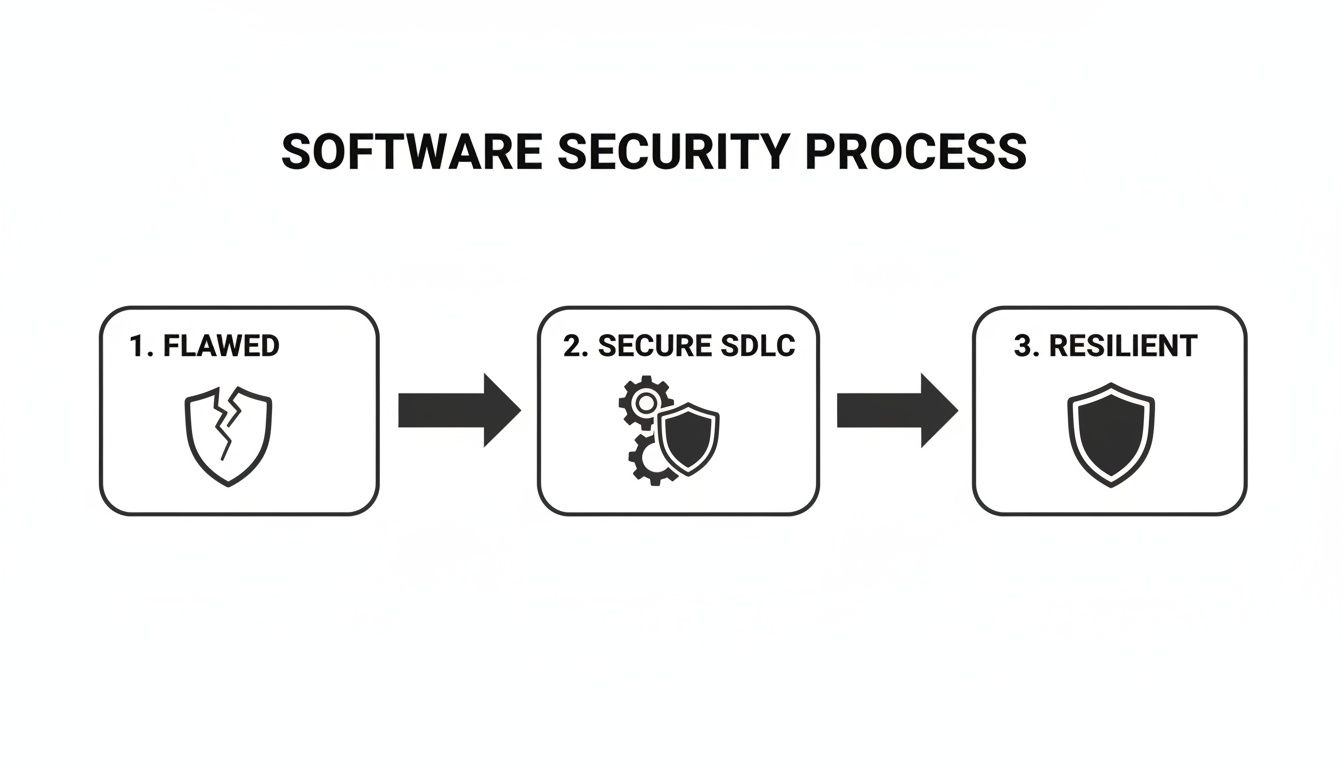
The secure SDLC is the engine that drives this transformation. Let’s break down what this actually looks like in practice, phase by phase.
Requirements Phase
The journey to secure software starts long before anyone writes a single line of code. During the requirements phase, the conversation has to expand beyond just user stories and features. We need to start asking, “How could this feature be misused?” right alongside “What should this feature do?”.
This is where you define abuse cases, which are essentially the evil twins of use cases. They force you to think like an attacker from the very beginning.
Practical Example: An Abuse Case
Imagine your team is building a new user profile page.
- Use Case: “As a user, I want to update my email address.”
- Abuse Case: “An attacker attempts to change another user’s email address by manipulating form parameters, hoping to take over their account.”
By thinking through that abuse case, a clear security requirement emerges: “The system must verify that a user is authenticated and authorised to change the email address for their own account before processing the request.” Just like that, security becomes a concrete, tangible goal from day one.
Design Phase
With solid security requirements in hand, the design phase is all about creating a secure architecture. The cornerstone of this phase is threat modelling—a structured way to identify potential threats and plan how to stop them. It’s not an abstract academic exercise; it’s a practical, collaborative brainstorming session.
A really popular method for this is STRIDE, which gives you a handy mnemonic for common threat types:
- Spoofing (impersonating someone or something else)
- Tampering (messing with data or code)
- Repudiation (denying you did something)
- Information Disclosure (leaking sensitive data)
- Denial of Service (making a system crash or become unavailable)
- Elevation of Privilege (gaining permissions you shouldn’t have)
Practical Example: Threat Modelling with STRIDE
Let’s apply STRIDE to a new login feature. The team might come up with threats like these:
- (Spoofing): An attacker could steal a user’s session cookie to impersonate them.
- (Information Disclosure): A vague login error message might reveal whether a username is valid or not (e.g., “User not found” vs. “Incorrect password”).
- (Denial of Service): An attacker could bombard the login page with failed attempts, locking out legitimate users.
Based on these specific threats, the team can now design concrete controls: using secure, HTTP-only session cookies; implementing generic error messages like “Invalid username or password”; and adding rate limiting to the login endpoint.
Development Phase
Now it’s time to write the code. During implementation, developers translate that secure design into reality. The focus here is on following secure coding standards, like those outlined in the OWASP Top 10, which highlights the most critical security risks for web applications. A practical example is a developer sanitizing all user input to prevent Cross-Site Scripting (XSS) attacks, ensuring that any scripts entered by a malicious user are not executed in another user’s browser.
This is also where automated tools become your best friends. Static Application Security Testing (SAST) tools scan your source code for potential vulnerabilities before it’s even run. Think of it as a powerful, security-aware spellchecker for your code, flagging things like SQL injection flaws or weak encryption algorithms right inside the developer’s editor.
When you integrate SAST into your CI/CD pipeline, you automate this check entirely. It provides instant feedback and can even prevent insecure code from ever being merged into your main branch. This creates a powerful, preventative security gate.
Testing Phase
The testing phase is about more than just making sure features work as expected. It requires dedicated security verification. This is where different types of security testing tools come into play, each with its own special purpose.
Dynamic Application Security Testing (DAST): Unlike SAST, DAST tools test your application while it’s actually running. They act like an automated attacker, probing the live application for vulnerabilities like Cross-Site Scripting (XSS) or misconfigured servers. A practical example is a DAST scanner automatically trying to inject malicious payloads into a web form on your staging server to see if the application is vulnerable.
Penetration Testing: This is where you bring in the humans. An ethical hacker will try to break into your application, providing a real-world assessment that automated tools can miss. They’re great at finding complex business logic flaws that machines just don’t understand. For example, a penetration tester might discover that they can add a high-value item to a shopping cart, apply a discount code, and then change the item ID to a different high-value item while keeping the discount, a flaw a machine would miss.
These testing methods are not an either/or choice; they work best together. SAST finds flaws in the code, DAST finds them in the running application, and penetration testing adds that crucial human element.
Release Phase
When it’s time to go live, the focus shifts to making sure the production environment itself is locked down. This means hardening servers, configuring firewalls correctly, and managing secrets like API keys and database passwords. Hard-coding secrets into your source code is a massive risk; they should always be stored in a proper secrets management tool. A practical example of this is using a service like AWS Secrets Manager to store a database password, and having the application retrieve it at runtime instead of including it in a configuration file.
Automation is your ally here. Using Infrastructure as Code (IaC) with tools like Terraform or Ansible lets you define your entire infrastructure in configuration files. This ensures every deployment is consistent, repeatable, and follows your security rules, eliminating the manual errors that often lead to vulnerabilities.
Maintenance Phase
Security is never “done.” The maintenance phase is a continuous cycle of monitoring, updating, and responding to new threats as they emerge. A key activity here is ongoing vulnerability management, which includes scanning your third-party libraries for known issues using Software Composition Analysis (SCA) tools.
A practical example is receiving an automated alert that a popular open-source library (like Log4j) used in your application has a new critical vulnerability. The team then uses the SCA tool’s report to quickly identify all affected projects and deploy a patched version within hours.
This is also where new regulations like the EU’s Cyber Resilience Act really come into play. Having a documented process for delivering timely security updates is no longer just a good idea—it’s often a legal requirement. You can get a detailed breakdown of these ongoing duties in our guide on the CRA’s update requirements. A solid maintenance plan ensures your product stays secure for its entire life, protecting your users and your business.
To help you put all this into a coherent structure, the table below maps each SDLC phase to its core security activities, common tools, and the key documents you should be producing along the way.
Security Activities and Artifacts by SDLC Phase
| SDLC Phase | Key Security Activities | Example Tools | Key Artifacts |
|---|---|---|---|
| Requirements | Define security requirements, privacy policies, and abuse cases. | Requirements management tools (e.g., Jira, Confluence) | Security Requirements Document, Abuse Case List, Data Classification Policy |
| Design | Conduct threat modelling, perform architecture risk analysis. | Threat modelling tools (e.g., OWASP Threat Dragon, Microsoft Threat Modeling Tool) | Threat Model Diagrams, Data Flow Diagrams, Security Architecture Document |
| Implementation | Follow secure coding standards, use hardened libraries, perform code reviews. | SAST tools (e.g., Snyk, Veracode), IDE security plugins | Secure Coding Checklist, Code Review Reports, SAST Scan Results |
| Testing | Perform SAST, DAST, penetration testing, and SCA. | DAST scanners (e.g., OWASP ZAP, Burp Suite), SCA tools (e.g., Dependency-Check) | Penetration Test Report, DAST Scan Results, Software Bill of Materials (SBOM) |
| Deployment | Harden configurations, manage secrets securely, automate deployments. | IaC tools (e.g., Terraform, Ansible), secrets managers (e.g., HashiCorp Vault) | Hardening Checklists, Infrastructure as Code Scripts, Deployment Logs |
| Maintenance | Monitor for threats, manage vulnerabilities, apply security patches. | SIEM systems (e.g., Splunk), vulnerability scanners, SCA tools | Vulnerability Scan Reports, Incident Response Plan, Patch Management Records |
This table provides a clear roadmap, connecting the “what” (the activity) with the “how” (the tools) and the “proof” (the artifacts). Using it as a guide helps ensure no critical security step gets missed as you move from one phase of the lifecycle to the next.
Meeting EU Cyber Resilience Act Mandates
For businesses with products in the European Union, a secure software development life cycle is no longer just a best practice—it’s a legal obligation. The EU’s Cyber Resilience Act (CRA) transforms security from a technical goal into a mandatory requirement, directly impacting how you design, build, and maintain software. Think of this regulation as the bridge connecting your development practices to your legal responsibilities on the market.
Adopting a secure SDLC provides a clear and defensible framework for proving you meet these new rules. Instead of scrambling to respond to regulatory demands, your existing development processes become the very evidence that you are building security in from the ground up, just as the law requires.
The EU Council officially adopted the Cyber Resilience Act in March 2024, marking a major shift in product cybersecurity rules.
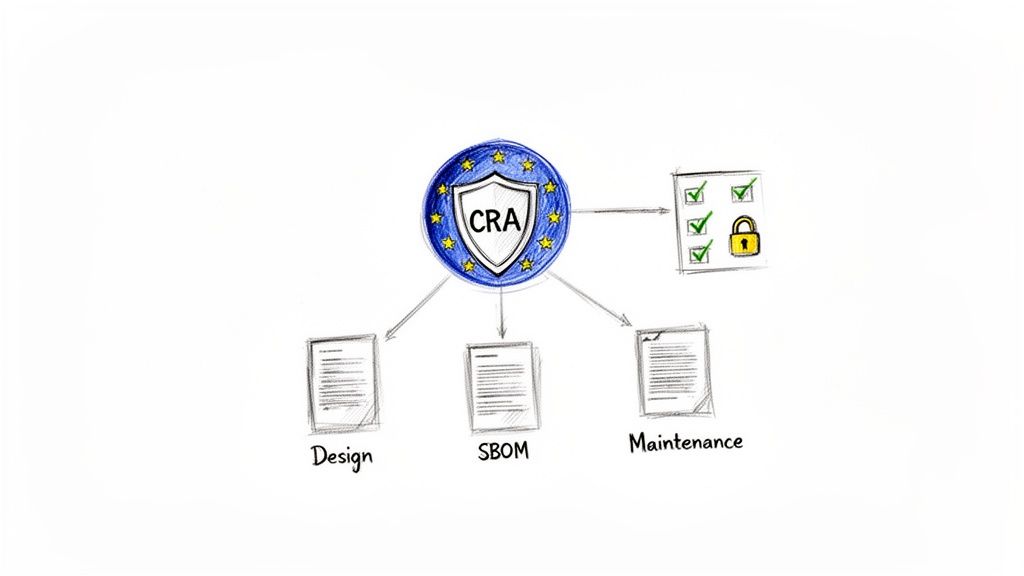
This visual gets to the heart of it: the CRA’s core principles—security by design, vulnerability handling, and transparency—are directly supported by activities you already do within a secure SDLC.
Aligning Your SDLC with Core CRA Obligations
The CRA introduces specific, actionable requirements that map almost perfectly to the phases of a mature secure SDLC. By understanding this alignment, you can turn your development workflow into a powerful compliance engine. This connection isn’t abstract; it’s a direct, phase-by-phase correlation.
Let’s look at how key SDLC activities directly fulfil some of the most critical CRA mandates.
Design Phase & Security-by-Design: The CRA’s Annex I explicitly requires manufacturers to design products to reduce the attack surface and prevent unauthorised access. Your threat modelling activities are the perfect response. When you use STRIDE to analyse a new feature and design controls to mitigate spoofing or tampering threats, you are performing and documenting the exact “security-by-design” process the regulation demands.
Implementation Phase & SBOM Mandates: The Act mandates full transparency into the software components used in your products. Generating a Software Bill of Materials (SBOM) during the implementation and testing phases directly addresses this. An SBOM is simply a formal, machine-readable inventory of all third-party libraries and dependencies—a cornerstone of modern supply chain security.
Maintenance Phase & Vulnerability Handling: The CRA places a heavy emphasis on post-market surveillance and coordinated vulnerability disclosure. Your maintenance phase activities, such as running SCA tools to find known vulnerabilities and having a clear policy for handling security reports from external researchers, are direct evidence of compliance.
Practical Examples of CRA Compliance in Action
Let’s translate these obligations into concrete development scenarios.
Example 1: Threat Modelling for “Security-by-Design”
- Scenario: Your team is designing a new cloud-connected smart thermostat.
- CRA Obligation: Annex I requires the product to be “designed, developed and produced” to ensure an appropriate level of cybersecurity.
- SDLC Action: During the design phase, the team conducts a threat modelling session. They identify a critical threat: an attacker could send malicious firmware updates to the device to take control of it (a Tampering threat).
- Compliance Evidence: To mitigate this, they design a secure boot process and require all firmware updates to be digitally signed. This decision is documented in the threat model report, creating a clear audit trail that proves “security-by-design” was implemented.
The Cyber Resilience Act isn’t just about what you do; it’s about what you can prove. Your SDLC artifacts—threat models, code scan reports, and vulnerability disclosure policies—are your proof of compliance. They demonstrate due diligence and a systematic approach to security.
Example 2: SBOM Generation for Transparency
- Scenario: A software company is preparing to release a new version of its enterprise resource planning (ERP) software.
- CRA Obligation: Manufacturers must provide an SBOM identifying the software components within their product.
- SDLC Action: As part of their CI/CD pipeline in the testing phase, they integrate an SCA tool. This tool automatically scans all dependencies and generates a complete SBOM in the standard SPDX format with every build.
- Compliance Evidence: This machine-readable SBOM is packaged with the product release documentation, fulfilling the transparency requirement and allowing customers to track vulnerabilities in the components used.
Long-Term Commitments and Deadlines
The CRA’s impact extends far beyond the initial product release. The regulation mandates a minimum 5-year security maintenance period for deployed software under Article 11. Full enforcement, including SBOMs and secure updates, begins by December 11, 2027. This timeline compels IoT vendors and manufacturers to overhaul their SDLCs to meet these legal requirements for products placed on the EU market.
This long-term support obligation makes the maintenance phase of your secure SDLC more critical than ever, requiring a robust plan for patching vulnerabilities for years after a product is sold.
Measuring the Success of Your Secure SDLC
Implementing a secure software development life cycle is a major step, but how do you actually prove it’s working? Once you’re up and running, the focus has to shift to measurement. Without data, security remains an abstract cost instead of a quantifiable business advantage. Tracking the right key performance indicators (KPIs) is the only way to demonstrate its effectiveness.
These metrics transform your security efforts from a collection of activities into a data-driven programme. They let you show real progress, justify investments in new tools or training, and pinpoint exactly where your process needs fine-tuning. It’s the difference between hoping you are secure and knowing you are becoming more resilient.
Key Metrics to Track Your Progress
To get a clear picture of your secure SDLC’s health, it’s best to focus on a few high-impact KPIs. These metrics provide real insight into the speed, efficiency, and overall effectiveness of your security practices. In short, they tell a story about how well your team is finding, fixing, and preventing vulnerabilities.
Here are some of the most critical metrics to start with:
- Mean Time to Remediate (MTTR): This measures the average time it takes for your team to fix a vulnerability once it has been discovered. For example, if your SAST tool finds 10 critical flaws and it takes a total of 20 developer-days to fix them, your MTTR for critical flaws is 2 days. A consistently decreasing MTTR is a powerful sign that your DevSecOps pipeline is becoming more efficient.
- Vulnerability Density: This metric calculates the number of vulnerabilities found per unit of code, such as per 1,000 lines. A downward trend in vulnerability density over time suggests that your preventative measures—like secure coding training and SAST tools—are successfully reducing the number of flaws being introduced in the first place.
- Security Training Completion Rates: This is a simple but vital KPI. It tracks how many developers have completed mandatory security training. High completion rates are directly correlated with a stronger security culture and fewer recurring coding mistakes.
A falling MTTR doesn’t just look good on a chart; it is tangible proof that your investment in security automation and developer training is paying off. It shows your ability to manage risk is maturing, which is a key component of any successful secure software development life cycle.
Interpreting the Data for Continuous Improvement
Collecting these metrics is only half the battle; the real value comes from interpreting them correctly. Each KPI tells you something specific about your process and where to focus your energy next. Understanding this data is also a core part of building a comprehensive file for regulatory audits, and a vital step in any thorough CRA risk assessment.
Let’s look at a practical example. Imagine your Vulnerability Density is high, but your MTTR is low. This might indicate that while your developers are very fast at fixing issues, too many vulnerabilities are being created at the outset.
The data points directly to a solution: invest more in proactive measures like advanced developer training or stricter SAST policies in the CI/CD pipeline to prevent those flaws from ever being written. This data-driven approach ensures your security budget is always aimed at the area of greatest impact.
Your Roadmap to Implementing a Secure Software Development Life Cycle
Rolling out a secure software development life cycle can feel like a huge project, but it’s not an all-or-nothing game. The smart way to tackle it is with a practical, phased roadmap that lets your organisation build momentum and show real progress. Breaking the journey down into manageable stages turns a daunting goal into a clear, achievable plan.
This approach means you can deliver value at every step, gradually maturing your security posture in line with regulatory timelines. The key is to nail the high-impact basics first and build from there, rather than trying to boil the ocean on day one.
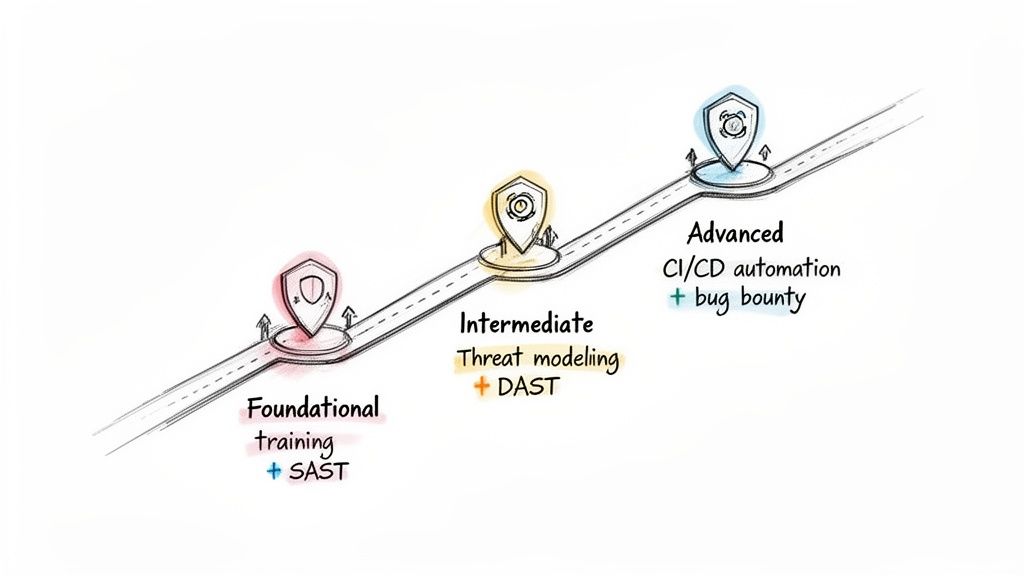
Stage 1: The Foundational Phase
This first stage is all about building awareness and locking in baseline security practices. The goal is simple: get the biggest security wins with the least disruption to your current workflows. This is where you lay the cultural and technical groundwork for everything that follows.
Think of this phase as focusing on prevention and early detection. You’re teaching your team the fundamentals of secure coding and giving them the tools to catch common mistakes before they become serious problems.
Your checklist for this stage should include:
- Developer Security Training: Get all your developers enrolled in training that covers common threats like the OWASP Top 10. This builds a shared language and understanding of the risks.
- Integrate SAST Tools: Introduce Static Application Security Testing (SAST) tools into your development environment. A great starting point is to run scans on a nightly basis.
- Establish Secure Coding Standards: Create and document a clear set of secure coding guidelines for your company’s main programming languages.
- Implement SCA: Use Software Composition Analysis (SCA) to scan your dependencies and flag known vulnerabilities hiding in third-party libraries.
Stage 2: The Intermediate Phase
With a solid foundation in place, the intermediate stage is where you get more proactive and bring in more automation. You’ll move beyond just finding basic coding flaws and start thinking more like an attacker, embedding security deeper into your design and testing processes.
The goal here is to make security a more structured and less manual part of your development life cycle. You can explore our detailed guide on creating a Cyber Resilience Act compliance roadmap to see how these stages align perfectly with what regulators demand.
Actions for the intermediate phase include:
- Introduce Threat Modelling: Start conducting basic threat modelling sessions for all major new features during the design phase. It’s about asking “what could go wrong?” before a single line of code is written.
- Automate DAST Scanning: Integrate Dynamic Application Security Testing (DAST) into your testing or staging environments. This helps you find vulnerabilities that only appear when the application is running.
- Secure the CI/CD Pipeline: Add automated SAST and SCA scans as mandatory checks in your Continuous Integration (CI) pipeline. This means you can block builds that try to introduce critical vulnerabilities.
Stage 3: The Advanced Phase
The advanced stage represents a mature secure software development life cycle. Here, security is fully automated, continuously monitored, and deeply woven into your company culture. This is the world of true DevSecOps, where the lines between development, security, and operations blur into a single, efficient flow.
At this level, you aren’t just reacting to threats; you’re actively hunting for them and using sophisticated techniques to prove your defences work.
Reaching this stage means security is no longer a separate activity but a seamless and automated part of how high-quality software is delivered. It reflects a commitment to resilience that goes far beyond basic compliance.
Your checklist for achieving this advanced maturity includes:
- Full CI/CD Security Automation: Implement security gates at multiple points in your CI/CD pipeline. Automatically fail builds based on SAST, DAST, and SCA results to stop threats in their tracks.
- Launch a Bug Bounty Program: Open the doors to external security researchers, inviting them to test your applications and rewarding them for finding and reporting valid vulnerabilities.
- Conduct Regular Penetration Testing: Bring in third-party experts to perform in-depth penetration tests on your critical applications at least once a year.
This phased approach gives you a clear path forward. However, data shows that adoption across the EU is uneven, with Germany at 45%, the UK at 37%, and France at 32%. This gap highlights the urgency for a structured plan, especially as SBOM adoption is even lower (20-25%), yet the CRA mandates them by 2027. You can read the full research on the European compliance operations gap at Help Net Security to better understand the landscape.
Answering Your Secure Secure Software Development Life Cycle Questions
As teams start weaving security into their development lifecycle, theory quickly gives way to practical, real-world questions. It’s one thing to talk about a secure SDLC, but it’s another to actually implement it without grinding everything to a halt. This section tackles some of the most common questions and myths we hear from organisations on the ground.
Our goal here is to cut through the noise and give you straightforward answers. By addressing these concerns head-on, you can clear the path for a much smoother and more effective adoption.
How Do We Add Security Without Slowing Developers Down?
This is the classic concern, and the answer is surprisingly simple: you do it with automation and a cultural shift, not by adding more manual gates. The aim is to make security a natural part of the developer’s workflow, not another frustrating bottleneck.
A great place to start is with low-friction tools. Think of a Static Application Security Testing (SAST) scanner that plugs directly into a developer’s IDE. It gives them instant, private feedback on their code as they type. It feels less like a judgment and more like a helpful spellchecker for security.
The most successful teams reframe security as a core quality metric, right alongside bug-free code. When you catch flaws early, you prevent the massive, time-consuming fixes that are the real project killers.
You can also transform the dynamic by celebrating teams that find and fix security issues. This shifts the model from “security police” to one where everyone feels a sense of ownership over the product’s resilience.
What Is the Difference Between a Secure Software Development Life Cycle and DevSecOps?
This is a fantastic question because the two concepts are deeply intertwined and often used interchangeably. The easiest way to think about it is that a secure SDLC is the ‘what’, while DevSecOps is the ‘how’.
Secure SDLC: This is your strategic framework. It’s the blueprint that lays out which security activities need to happen at each stage of development, from the first requirements document all the way through to maintenance.
DevSecOps: This is the cultural and technological engine that brings the framework to life. It’s all about using automation, collaboration, and tight integration to embed those security activities directly into your CI/CD pipeline.
In short, DevSecOps is the modern, agile way to execute a secure software development life cycle.
How Do We Secure a Product Already in the Market?
It’s never too late to start improving your security posture. For a product that’s already live and in customers’ hands, the trick is to use a hybrid approach. You need to secure what’s currently out there while building a much stronger foundation for everything new.
Start by focusing on the ‘Maintenance’ phase for your existing product. A few key actions will give you the biggest wins:
- Implement a Vulnerability Disclosure Program: Give security researchers a clear, safe channel to report any flaws they discover.
- Use Software Composition Analysis (SCA): Run an SCA tool to find known vulnerabilities in the third-party libraries your product relies on. This is often where the most critical risks are hiding.
- Commission a Penetration Test: Bring in an external team to perform a thorough security assessment. They’ll find weaknesses that your internal team, with its inherent biases, might miss.
At the same time, make sure all new features and future versions of the product follow the full secure SDLC from day one. This dual strategy helps you manage the risk in your deployed software while ensuring all future development is secure by design.
Secure SDLC and CRA: Frequently Asked Questions
Does the Cyber Resilience Act require a Secure SDLC?
The CRA does not explicitly mandate a specific “Secure SDLC framework,” but it requires security-by-design, vulnerability handling, and secure update mechanisms. A structured Secure SDLC is the most practical way to demonstrate compliance with these obligations.
Is an SBOM mandatory under the CRA?
Yes. The CRA requires manufacturers to ensure transparency of software components. Maintaining a Software Bill of Materials (SBOM) supports supply chain visibility and helps fulfill technical documentation requirements.
How long must security updates be provided under the CRA?
Manufacturers must provide security updates for the expected product lifetime, with a minimum support period defined in the regulation. Organizations must ensure vulnerabilities are handled and patches are delivered within reasonable timelines.
What documentation is required to prove Secure SDLC compliance?
Organizations should retain:
- Threat modeling documentation
- Security requirements and architecture reviews
- SAST, DAST, and SCA reports
- SBOM records
- Vulnerability handling and patch management logs
These artifacts demonstrate security-by-design and post-market compliance readiness.
Navigating the requirements of a secure SDLC, especially under regulations like the CRA, can be complex. Regulus provides a clear path forward, helping you assess applicability, map requirements, and generate the necessary documentation to achieve compliance confidently. Reduce your reliance on spreadsheets and get a step-by-step roadmap to place compliant products on the EU market. Learn more about Regulus.


