
The VirusTotal API gives you programmatic access to VirusTotal’s enormous, crowdsourced database of threat intelligence. In simple terms, it lets developers and security teams automatically check files, URLs, domains, and IP addresses against the findings of over 70 different security vendors and scanning engines. It’s your direct, automated gateway to one of the world’s largest collections of malware data.
Understanding the VirusTotal API and Its Role in CRA Compliance

It’s important to realise that the VirusTotal API is not a traditional antivirus solution that blocks threats in real-time. Think of it instead as a powerful analysis and investigation tool. When you submit an indicator—like a file hash or a domain name—your application gets back a detailed report that consolidates findings from dozens of different security tools. For example, submitting a URL might reveal that while only 3 engines flag it as malicious, one of those is a top-tier security vendor known for accurate phishing detection, giving you crucial context beyond a simple “good” or “bad” verdict. This gives you a rich, multi-faceted view of any potential threat.
For manufacturers of products with digital elements, this capability is more than just a security feature; it’s a core component of modern compliance. The EU’s Cyber Resilience Act (CRA) places strict obligations on companies to continuously monitor for and manage vulnerabilities in their products long after they are sold. Manual analysis simply can’t keep up.
Automating Security for Post-Market Surveillance
Integrating the VirusTotal API lets you automate critical security workflows, which is absolutely essential for meeting the CRA’s requirements for post-market surveillance and ongoing vulnerability management. Instead of having someone manually check suspicious files or domains, your systems can perform these checks programmatically. You can explore our detailed guide on CRA vulnerability handling requirements for a deeper dive into these obligations.
By embedding the VirusTotal API into your development and security operations, you transform compliance from a reactive, manual burden into a proactive, efficient, and scalable process.
This programmatic approach provides a clear, auditable trail of due diligence—something that is critical for demonstrating compliance to regulators. For example, your systems can automatically:
- Scan new firmware builds before deployment to check for embedded malware. A practical script could calculate the SHA-256 hash of a
firmware-v2.1.binfile and query the API to ensure zero malicious detections before it’s pushed to production. - Analyse URLs and IP addresses that your IoT devices connect to, identifying potential command-and-control servers. For instance, a nightly job could extract all unique domains from device logs and run them through the
/domain/reportendpoint to flag any with recent malicious associations. - Investigate suspicious files reported by users or discovered during internal audits. If a customer support ticket includes a strange
.dllfile, your ticketing system could auto-submit its hash to VirusTotal and attach the results directly to the ticket for faster analysis.
By using the VirusTotal API, your engineering and compliance teams gain the tools to build a robust, automated defence system that directly addresses key CRA mandates. This helps ensure your products remain secure and compliant throughout their entire lifecycle.
Managing VirusTotal API Authentication and Keys
All communication with the VirusTotal API is authenticated through an API key. Every request you send must include a valid key, which serves to identify your application and enforce your access level. Without a valid key, the API will simply reject your request.
You will find your API key within your user profile settings on the VirusTotal website. To authenticate an API call, you must include this key in the x-apikey HTTP header. It’s your unique credential for accessing the service.
Here’s a practical curl example showing how to include the key when requesting a file report. Just remember to replace YOUR_API_KEY with your actual key.
# Example curl request to get a file report
# Replace YOUR_API_KEY with your actual VirusTotal API key
# Replace {file_hash} with a real SHA-256 hash of a file
curl --request GET
  --url https://www.virustotal.com/api/v3/files/{file_hash}
  --header 'x-apikey: YOUR_API_KEY'
Public vs. Private API Keys
VirusTotal provides two main types of API keys: the free Public API key and the commercial Private/Premium API key. The type of key you have determines your request rate limits, which features you can access, and your licensing terms.
Making the right choice here is critical. Using a Public API key for a commercial product or a high-volume workflow not only leads to service interruptions from rate limiting but also violates the terms of service. This is especially important for integrations supporting Cyber Resilience Act (CRA) compliance, where reliability is non-negotiable.
The following table breaks down the fundamental differences between the two key types.
VirusTotal API Key Types Comparison
| Feature | Public API Key | Private/Premium API Key |
|---|---|---|
| Intended Use | Personal, non-commercial research | Commercial products, enterprise use, CRA workflows |
| Rate Limit | Heavily restricted (e.g., 4 requests/minute) | High-volume, customisable limits |
| Advanced Features | Basic scanning and reports | Advanced search, private scanning, threat intelligence feeds |
| License | Non-commercial use only | Commercial use permitted |
While a public key is perfectly fine for initial testing and personal research, any serious product integration demands a private key. For example, a simple script that checks 100 domains from your product’s telemetry data would take 25 minutes with a public key, but could be completed in under a minute with a private key. For automated vulnerability management or to meet the continuous monitoring requirements of the CRA, upgrading to a private key is mandatory. This ensures you have the necessary request volume, access to advanced features, and legal standing for commercial use.
Using Core API Endpoints for File Analysis
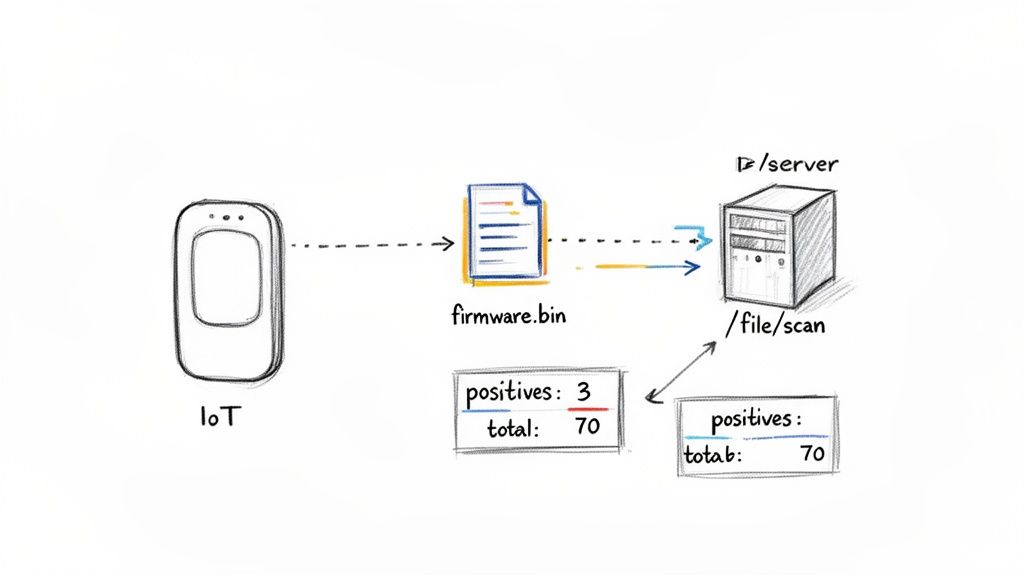
To get the most out of the VirusTotal API in your security workflows, you need to get familiar with its core file analysis endpoints. These are the workhorses for submitting files and pulling back detailed reports. Each endpoint has a specific job in the file analysis lifecycle.
Your journey usually starts with the /file/scan endpoint. This is what you use to upload a new file that VirusTotal hasn’t seen before. Think of it as the first step for analysing anything unique, like a fresh firmware build or a suspect email attachment.
Once you submit a file, it enters an analysis queue. You can then use the /file/report endpoint to check on the scan’s progress and, ultimately, fetch the final results. This endpoint is absolutely central to any automated workflow, as it delivers the actionable intelligence you need.
Understanding Key File Endpoints
For file analysis, three endpoints are critical: /file/scan, /file/rescan, and /file/report. Getting their specific roles right is the key to building efficient automation.
- /file/scan (POST): Use this endpoint for the initial upload of a file. The API will respond with a scan ID, which you’ll then use to track the analysis.
- /file/rescan (POST): If a file has already been analysed in the past, this endpoint forces a completely new analysis. It’s perfect for getting an up-to-date report on a file that might have been re-classified since its last scan.
- /file/report (GET): This fetches the most recent analysis report for a file using its hash (MD5, SHA-1, or SHA-256). It is the most common endpoint for checking a file’s reputation.
When you’re integrating the VirusTotal API, remember that managing your credentials securely is non-negotiable. For a solid overview on handling API keys and other sensitive information, take a look at this guide on DevOps secrets management.
Here’s a practical example: an IoT manufacturer wants to build a script to help secure their supply chain. Every time a new firmware binary is compiled, a script can automatically calculate its SHA-256 hash and query the /file/report endpoint.
If the report comes back with a high
positivescount—say, more than 2 detections out of atotalof 70+ scanners—the script can immediately flag the build and alert the security team. This kind of proactive check is a powerful way to stop compromised software from ever being distributed.
By scripting these checks, you automate a fundamental part of your product security. For a broader view on how this fits into a larger compliance strategy, you can read our guide to understand how to scan for malware effectively.
Analysing URLs, Domains, and IPs with Advanced Endpoints
Product security isn’t just about scanning files. It requires a complete view of every internet resource your devices interact with. The VirusTotal API has specialised endpoints for analysing URLs, domains, and IP addresses, helping you uncover threats like phishing sites or command-and-control (C2) servers before they cause damage.
This kind of proactive analysis is exactly what regulations like the Cyber Resilience Act (CRA) mandate. By regularly checking the network destinations your products communicate with, you can spot potential compromises early. This is where endpoints like /url/scan and /domain/report become essential tools in your security toolkit.
Key Network Analysis Endpoints
To check network resources, you’ll mainly be using a few core endpoints. Each is built for a specific job in your threat intelligence workflow.
- /url/scan (POST): This is your starting point for any new URL. Submitting it here queues it for analysis, especially if VirusTotal hasn’t seen it recently.
- /url/report (GET): Use this to pull the latest analysis report for a URL. You can query with the URL itself or use the scan ID returned from a previous scan.
- /domain/report (GET): Provides a deep dive into a domain, pulling together historical data, passive DNS information, and any related malicious samples.
- /ip-address/report (GET): Fetches the full report for an IP address, detailing its reputation and any malicious activity associated with it.
As a practical example, your security team could write a script to vet all hardcoded domains in your firmware. The script would simply iterate through a list of domains and hit the /domain/report endpoint for each one, ensuring none are linked to known malicious infrastructure.
# Example curl request to get a domain report
# Replace YOUR_API_KEY with your key and example.com with the target domain
curl --request GET
  --url https://www.virustotal.com/api/v3/domains/example.com
  --header 'x-apikey: YOUR_API_KEY'
Interpreting the JSON response from these endpoints is key. Don’t just look at the
positives/totalcount. Dig into fields like passive DNS records. This data shows which IP addresses a domain has resolved to over time, which can uncover hidden connections to shared malicious hosting.
This depth of information lets your team build a much richer picture of a resource’s actual risk. For instance, a domain might have zero malicious detections, but its passive DNS history shows it was hosted on the same IP as a known malware distributor last month. This context, available via the API, is a powerful indicator of risk that a simple blocklist would miss. By automating these checks, you create a robust, CRA-aligned security posture, demonstrating the ongoing due diligence required to ensure your products don’t communicate with compromised internet endpoints.
Navigating Rate Limits and Handling API Errors
Building a truly reliable integration with the VirusTotal API means preparing for the moments when things don’t go as planned. Every API has usage quotas, and knowing how to work within those rate limits and handle error responses gracefully is what separates a fragile script from a resilient, production-ready security system.
If you ignore these rules, you can expect failed requests and service disruptions. The Public API key, for example, is strictly limited to just four requests per minute. A private key offers much higher throughput, but even it has limits that your application must respect to ensure consistent performance. This is why robust error handling isn’t just a nice-to-have; it’s a core requirement for building stable security automation.
Understanding Common API Errors
When your application makes an invalid request or smashes through its quota, the VirusTotal API will return a standard HTTP status code to tell you what went wrong. Getting familiar with these codes is the first step toward building logic that can actually handle these situations. Proper logging and monitoring of these errors are also key components for compliance, as we cover in our guide on CRA logging and monitoring requirements.
Here’s a quick-reference table for the most common error codes you’re likely to run into when working with the API.
Common VirusTotal API Error Codes and Resolutions
This table breaks down the typical HTTP error codes you’ll see from the VirusTotal API and provides clear, actionable steps for each one. Keep this handy when you’re debugging your integration.
| HTTP Status Code | Meaning | Recommended Action |
|---|---|---|
| 204 No Content | Rate limit exceeded. | Your script is making too many requests. You need to implement a delay (exponential backoff) before retrying the request. |
| 400 Bad Request | The request was malformed. | Double-check that your request body, parameters, and headers are all correctly formatted according to the API documentation. For example, you might have sent a malformed hash. |
| 401 Unauthorized | Your API key is missing or invalid. | Make sure the x-apikey header is included and that the key itself is correct, active, and has not been revoked. |
| 403 Forbidden | You lack the necessary permissions. | This usually means your API key doesn't have access to the feature (e.g., using a public key for a private API feature). |
| 404 Not Found | The requested resource does not exist. | The file hash, URL, or domain you queried isn’t in the VirusTotal dataset. This is expected for new or unknown items. |
Treating these codes as part of your normal operational flow, rather than as exceptions, will make your integration far more robust and predictable in the long run.
A Practical Example: Implementing Exponential Backoff
The error you’ll hit most often in any high-volume script is the 204 No Content rate limit. Instead of just letting the request fail, your script should be smart enough to wait and try again. The best way to do this is with exponential backoff, a simple strategy where the delay between retries increases after each failure.
Here’s a basic Python example that shows how this logic works:
import requests
import time

def request_with_backoff(url, headers):
    retries = 5
    delay = 1 # Start with a 1-second delay
    for i in range(retries):
        response = requests.get(url, headers=headers)
        if response.status_code == 204:
            print(f"Rate limit hit. Retrying in {delay} seconds...")
            time.sleep(delay)
            delay *= 2 # Double the delay for the next attempt
        elif response.status_code == 200:
            return response.json()
        else:
            # For other errors, it's better to fail fast
            response.raise_for_status()
    raise Exception("Max retries exceeded after multiple failures.")
This approach ensures your automation can withstand temporary service limits without crashing, which is a crucial feature for any system designed for continuous security monitoring or vulnerability management.
The significant growth of the European endpoint security market, which hit USD 5.05 billion in 2024, just highlights how much organisations are relying on automated threat intelligence. With projections showing the market will reach USD 10.09 billion by 2033, building robust and resilient API integrations is essential to protect the huge number of endpoints that remain vulnerable. You can find more insights on these trends over at marketdataforecast.com. This growth is exactly why automated, resilient solutions are no longer optional.
Automating Security Workflows for CRA Compliance
The real power of the VirusTotal API isn’t just in its data, but in how you can use it to automate security workflows and build a defensible CRA compliance posture. For any organisation navigating the Cyber Resilience Act, the goal is to create repeatable, auditable security processes that directly address the regulation’s strict demands.
This goes far beyond occasional manual lookups. True CRA compliance means embedding threat intelligence deep into your core operations, from the development lifecycle all the way to post-market surveillance. Each integration pattern acts as a blueprint for using the API to meet and document specific CRA obligations, turning compliance from a burdensome manual task into a continuous, automated function.
Actionable Integration Patterns for CRA
To build a credible compliance case, you need to implement specific, automated workflows that use the VirusTotal API. These patterns provide clear evidence of the due diligence and continuous monitoring that are central to the CRA’s requirements.
Here are three practical integration patterns you can build:
- Automated Post-Market Surveillance: Develop scripts that periodically pull domains and IP addresses from your product’s network logs. These scripts can then query the VirusTotal API’s
/domain/reportand/ip-address/reportendpoints to confirm your devices aren’t communicating with known malicious infrastructure. For example, a cron job could run daily, parsing logs from the previous 24 hours and creating a security alert if any queried IP has more than one malicious detection. - Streamlined Vulnerability Triage: Integrate the
/file/scanendpoint directly into your bug bounty or vulnerability reporting platform. When a security researcher submits a suspicious file, your system can automatically push it to VirusTotal for instant analysis, dramatically cutting down your triage and response times. For guidance on integrating different security tools, you might find it helpful to look into how to best use https://goregulus.com/cra-basics/siem-open-source/. - Secure Supply Chain Management: As a part of your CI/CD pipeline, write a script that scans every third-party library and dependency defined in your Software Bill of Materials (SBOM). By checking the hash of each component against the
/file/reportendpoint, you can catch compromised dependencies before they are ever compiled into a final product release. A practical example would be a Jenkins or GitHub Actions step that fails the build if a dependency likelog4j-core-2.14.1.jarshows any new malicious flags.
The following diagram outlines a simple but essential process for managing API requests, ensuring your automations can run at scale without being interrupted by rate limits.

This flow underscores the need to build resilient logic, like exponential backoff, directly into your API integrations from day one. The scale of today’s API-driven supply chains makes this kind of robust automation a necessity, not a luxury. For instance, Europe’s generic API pharmaceutical market claimed a 58% revenue share in 2023, a sector powered by over 350 firms in Spain and Italy alone that face very similar digital supply chain risks. Using AI for regulatory compliance, particularly with powerful tools like the VirusTotal API, is becoming indispensable for navigating complex new rules like the CRA.
Frequently Asked Questions About the VirusTotal API
When you’re integrating a new tool, questions are inevitable. This section cuts straight to the practical answers for the most common queries we see about using the VirusTotal API, especially for product security and compliance workflows.
Our goal here is to give you the clarity you need to integrate this powerful threat intelligence resource the right way.
Can I Use the Free Public API for a Commercial Product?
No. The free VirusTotal public API comes with a strict non-commercial licence. It’s also heavily rate-limited, making it completely unsuitable for any business use case. Think of it as a tool for personal research or academic projects only.
For any commercial application—whether that’s integrating it into your product or using it for internal Cyber Resilience Act (CRA) compliance workflows—you must use the private/premium API. This is the only way to get the request volume, performance, and legal rights needed for a business context.
How Is the VirusTotal API Different from Antivirus?
A standard antivirus (AV) client provides real-time protection. It’s a shield, actively scanning for and blocking threats on a single device.
The VirusTotal API is different; it’s a threat intelligence aggregator. It doesn’t block anything directly. Instead, it consolidates the analysis results from over 70 different AV scanners and security services to give you a comprehensive second opinion on a file or URL. It’s a tool for investigation and analysis, not real-time endpoint defence.
Think of it like this: an antivirus is the guard at the gate, while the VirusTotal API is the intelligence agency providing a detailed background check on everyone who wants to enter.
What Is the Best Way to Analyse Large Files with the API?
The API has a file size limit for direct uploads, which is typically 32MB for the standard /file/scan endpoint. For anything larger, the correct and most efficient method is a two-step process that starts by calculating the file’s hash—preferably SHA-256.
Once you have the hash, your first move should be to query the /file/report endpoint.
- If VirusTotal has already analysed the file, you get an instant report without uploading a single byte. This is a huge time and bandwidth saver. For example, if you need to check a 500MB firmware image, getting a report instantly via its hash saves significant upload time.
- If the file is unknown to VirusTotal, you then use the
/file/upload_urlendpoint. This will give you a special, one-time URL for uploading files up to 650MB.
This two-step approach is the established best practice for handling large files. It ensures you respect API resources and only upload when absolutely necessary.
Gain clarity and confidence in your compliance strategy with Regulus. Our platform provides a step-by-step roadmap to navigate the Cyber Resilience Act, helping you prepare for regulatory deadlines without the high cost of consulting. Visit us at https://goregulus.com to see how we can simplify your CRA compliance journey.